HOME/youmu perch

Product series for Canvas LMS
Canvas LMS を、
日本の大学の運用に合わせる。
Fit Canvas LMS to the way Japanese universities run.
youmu perch. は、Canvas LMS を日本の大学で使いこなすための、ヨウム製の製品シリーズです。教材の移行から、学務システムとの連携、学修データの活用、そして停止時の備えまで。止まり木(perch)のように、Canvas と大学の現場のあいだに立ちます。youmu perch. is Youmu’s product series for making Canvas LMS work at Japanese universities — from course migration and SIS integration to learning data and readiness for outages. Like a perch, it stands between Canvas and the campus.
Lineup
導入から日々の運用、もしもの日まで。
4 つの場面を、7 つの製品で支えます。From rollout to daily operations to the day things stop — seven products for four scenes.
Canvas LMS はグローバル基準で設計された、シンプルで拡張性の高い LMS です。日本の大学の学務や授業の慣習とのあいだに生まれる「すき間」を、場面ごとの製品で埋めていきます。Canvas LMS is a simple, extensible LMS designed to global standards. Scene by scene, our products fill the gaps between it and the administrative and teaching practices of Japanese universities.
移行するMigrate他の LMS から Canvas へ

他の LMS の教材を Canvas LMS へ移行します。Moves course content from another LMS into Canvas LMS.

教職員・学生向けの日本語マニュアル。Japanese manuals for faculty, staff and students.
つなぐ・管理するConnect & manage学務システムと Canvas

SIS のデータを差分で自動連携し、日本の大学に必要な管理機能を補います。Syncs SIS data by delta and adds the admin functions Japanese universities need.
学びを深めるDeepen learning授業と学修データ

教材に書き込みながら読む、注釈・ソーシャル読解。Annotation and social reading — read by writing in the margins.

学生どうしの相互評価。Peer assessment between students.

学修データを集め、ダッシュボードやフォームとして形にします。Gathers learning data and shapes it into dashboards and forms.
止まっても続けるKeep goingクラウド停止への備え

Canvas に接続できない日も、当日の教材を学内から取り出せます。Even when Canvas is unreachable, today’s materials can be retrieved on campus.
Platform
すべての製品が、
youmu perch. の共通基盤の上で動きます。Every product runs on the shared youmu perch. platform.
- LTI 1.3 で、Canvas LMS の中から起動Launches inside Canvas LMS via LTI 1.3
- 日本の大学の運用を前提にした日本語の画面Japanese screens designed around how Japanese universities operate
- 必要な製品から選び、あとから追加できるStart with what you need and add more later
- 導入の相談から運用まで、ヨウムが国内で対応Youmu supports you in Japan, from consultation to operations
Connect & manage
学務システムと Canvas LMS のあいだを、
自動でつなぐ。Connect your SIS and Canvas LMS, automatically.
Canvas LMS のシンプルなデータ構造は、世界中で使える汎用性の裏返しです。大学ごとに異なる SIS の形式、教室ごとの履修管理、教員の異動や復帰。日本の大学で手作業になりがちな運用を、2 つのエンジンで引き受けます。(旧 Canvas Admin)Canvas LMS’s simple data model is the flip side of its worldwide versatility. Different SIS formats at each university, enrollment by classroom, faculty who move and return — two engines take on the work that often ends up manual at Japanese universities. (Formerly Canvas Admin)
Sync Service
データ連携エンジンData sync engine
SIS のユーザ・科目・履修データを、大学独自の形式のまま受け取り、変更分だけを Canvas LMS へ流し込みます。Receives SIS users, courses and enrollments in your own format and pushes only the changes into Canvas LMS.
- 独自フォーマットYour own format
- 差分抽出Delta extraction
- 実行タイミング指定Scheduled runs
- ブループリント自動紐付けAutomatic blueprint linking
Functions Plus
機能拡張エンジンExtension engine
Canvas LMS 単独では足りない、日本の大学に固有の管理機能を補います。Adds the university-specific admin functions that Canvas LMS alone does not cover.
- 独自項目(Custom Fields)Custom fields
- 更新の一時遮断(Emergency Override)Emergency override of updates
- 名寄せ(Identity Master)Identity master for returning faculty
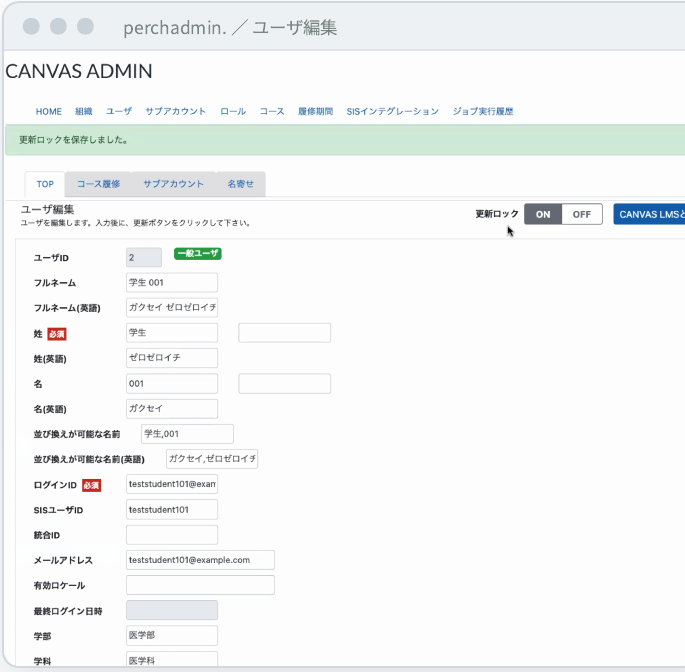
ユーザ編集 — 学部・学科・入学年度などの独自項目を追加。「更新ロック」で SIS からの上書きを一時的に止められます。User editing — add custom fields such as faculty, department and entry year, and pause SIS overwrites with an update lock.
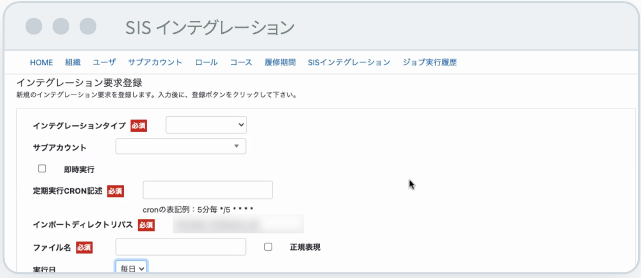
SIS 連携の登録 — 取り込むデータの種類、実行日時や曜日を指定します。SIS integration — choose which data to import and when it runs.
Canvas LMS 単独との違いCompared with Canvas LMS alone
| 項目Area | Canvas LMS 単独Canvas LMS alone | perchadmin. を使う場合With perchadmin. |
|---|---|---|
| データ連携Data sync | Canvas 指定の CSV 形式に合わせるMatch Canvas’s CSV format | 大学独自の SIS 形式をそのまま受け取るAccepts your SIS format as it is |
| 処理Processing | 全件を読み込むLoads every record | 差分だけを連携し、短時間で終わるSyncs only changes, finishing quickly |
| 科目管理Courses | 教室ごとに手作業で登録Registered by hand, classroom by classroom | ブループリントへ自動で紐付け、履修者は教室ごとに分けて登録Linked to blueprints automatically, with enrollments split by classroom |
| 教員の IDFaculty IDs | 復帰した教員は新しい ID になり、過去の教材と分断Returning faculty get new IDs, cut off from past content | 名寄せで統合し、過去の教材へのアクセスを復元Merged by identity master, restoring access to past content |
| 緊急時の修正Urgent fixes | 次の同期で SIS のデータに上書きされるOverwritten by SIS data at the next sync | 更新ロックで指定期間だけ上書きを止めるAn update lock pauses overwrites for a set period |
See the learning
学修データを、
自分たちの手で形にする。Shape learning data with your own hands.
さまざまなデータソースから必要なデータを取り出し、グラフやウィジェットにして、学生のダッシュボードや入力フォームに配置します。大学がほしい見え方を、大学自身で作れます。(旧 Learning Data Insight、製品名 LENZ)Pull the data you need from many sources, turn it into charts and widgets, and place them on student dashboards and input forms. Your university builds the views it wants. (Formerly Learning Data Insight; product name LENZ)
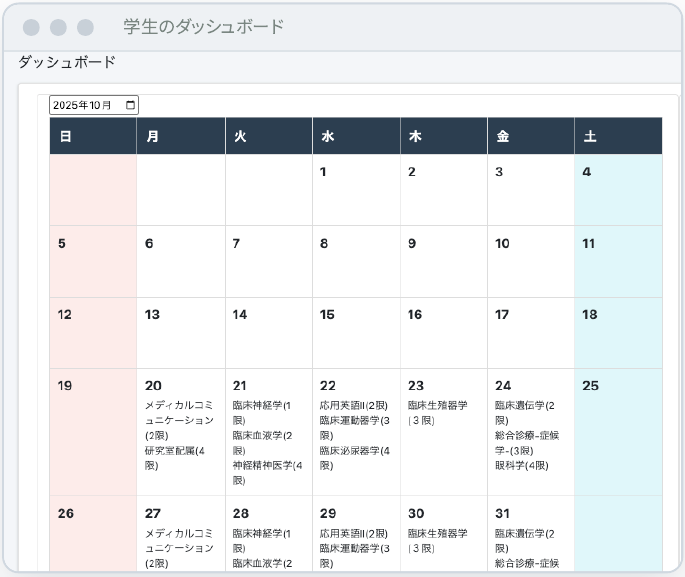
学生のダッシュボード — ログインすると、カレンダーや時間割、学修成果のグラフ、TODO などのウィジェットが並びます。配布された入力フォームに記入し、提出先の教員を選んで提出できます。Student dashboard — calendar, timetable, outcome charts and to-dos on login; students fill in distributed forms and submit them to a chosen teacher.
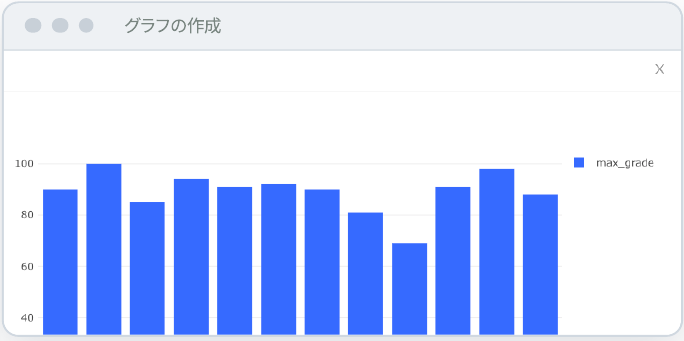
グラフにする — クエリの結果を、棒グラフなどに設定するだけで可視化します。Charts — set a query result to a bar chart or other type to visualize it.
運営者の「創る自由」と、利用者の「使う喜び」を、高い次元で両立する。The freedom to build for administrators, and the joy of use for everyone who uses it — both at a high level.
教員・運営者は、4 つの手順で作るFour steps for faculty and administrators
- データを集めるCollect
データソースを登録し、SQL でクエリを作成。複数のデータソースをまたいだ集計もできます。Register data sources and write SQL queries, even across several sources.
- グラフにするChart
クエリの結果を、棒グラフなどに設定するだけで可視化。Visualize query results as bar charts and more.
- ウィジェットにするBuild widgets
HTML・JavaScript・CSS で、表示を自由に作り込めます。Craft the display freely with HTML, JavaScript and CSS.
- 並べて配布するArrange and share
部品をダッシュボード・フォームにドラッグ&ドロップで配置し、本人記入・他者記入を設定して配布。Drag parts onto dashboards and forms, set who fills them in, and distribute.
Keep classes going
Canvas が止まった日も、
授業は着陸できる。Even on the day Canvas stops, classes can land.
クラウドサービスは高い可用性で運用されていますが、停止を完全になくすことはできません。perchglide. は、前夜のうちに当日の教材を学内に用意しておき、Canvas に接続できない日でも、先生が自分で教材を取り出せるようにします。Cloud services run with high availability, but outages can never be fully eliminated. perchglide. prepares the next day’s materials on campus the night before, so teachers can retrieve them themselves even when Canvas is unreachable.
- 毎晩Every night
次の 2 授業日分の教材を用意。時間割と学年暦から開講科目を特定し、祝日や振替授業日にも対応します。Prepares materials for the next two class days from the timetable and academic calendar, including holidays and make-up days.
- 毎朝Every morning
学内に保管し、点検。新しい教材がそろってから切り替え、点検結果は正常でも異常でも必ず届きます。Stores them on campus and checks them; switches only when the new set is complete, and always reports the result.
- 停止時During an outage
先生が自分で取り出す。ログインして、その日の担当科目をダウンロード。ブラウザでもそのまま開けます。Teachers log in and download today’s courses, or open them in the browser.
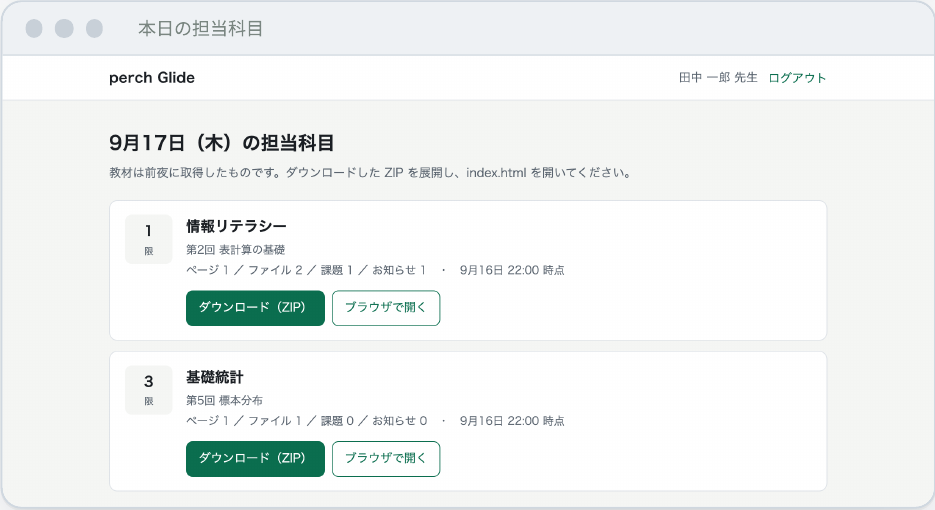
本日の担当科目 — 自分が担当する科目だけが、時限の順に並びます。いつ時点の教材かも一目でわかります。Today’s courses — only your own courses, in period order, with the time the materials were captured.
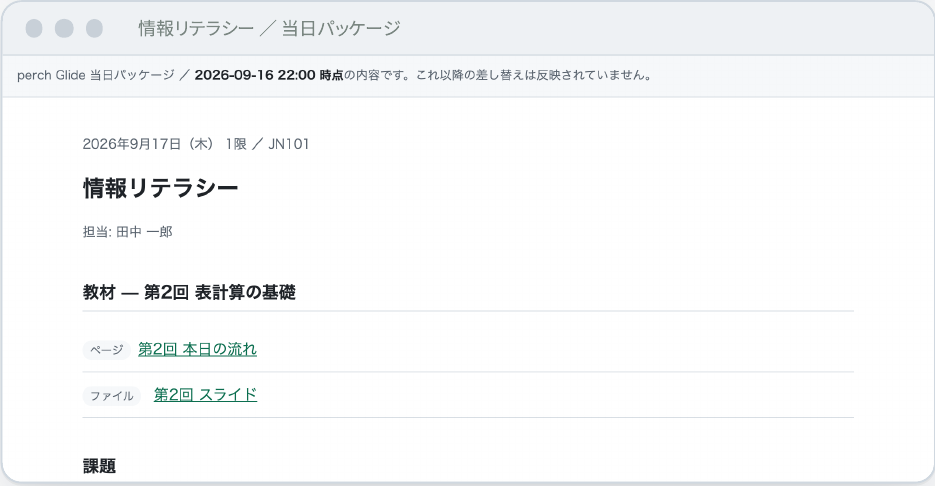
当日パッケージ — ZIP でダウンロードすれば、教室のネットワークがなくても開けます。展開して index.html を開くだけです。Day package — download as ZIP and open it without a network; just unzip and open index.html.
扱うもの・扱わないものWhat it covers, and what it doesn’t
In scope
扱うものCovered
その日の授業を実施できることに、役割を絞っています。Focused on letting the day’s classes go ahead.
- その回のモジュールのページPages from that session’s module
- 配布ファイル(PDF・スライドなど)Handouts such as PDFs and slides
- 当日締切の課題の説明(提出は受け付けません)Descriptions of assignments due that day (no submissions)
- 直近 7 日分のお知らせAnnouncements from the last seven days
- 科目のシラバス本文The course syllabus
Out of scope
扱わないものNot covered
停止中のすべてを肩代わりする製品ではありません。It does not stand in for everything during an outage.
- 課題の提出(締切の延長規程で対応)Assignment submissions (handled by deadline-extension rules)
- 小テスト・試験(設問は取得・保管しません)Quizzes and exams (questions are never fetched or stored)
- 成績・提出物(個人情報を保管しません)Grades and submissions (no personal data is stored)
- 動画・ディスカッションVideo and discussions
- 当日朝の差し替え(前夜の時点の内容です)Same-morning changes (content is as of the night before)
安心して置いておける設計Designed to sit quietly, ready
- Canvas に依存しないログイン — 停止中でも先生がログインできますLogin independent of Canvas — teachers can sign in during an outage
- 自分の担当科目だけ — 全科目を見られる権限は、管理者用にも作りませんOnly your own courses — no all-courses access, not even for admins
- 設問を持たない — 小テスト・試験の設問の写しを、平常時から作りませんNo questions kept — quiz and exam questions are never copied
- 保管は直近 2 回分だけ — 古い教材は自動で削除しますOnly the last two sets are kept — older materials are deleted automatically
- 空の箱にしない — 新しい教材がそろうまで、前回分を消さずに残しますNever empty — the previous set stays until the new one is complete
- 点検結果は毎朝必ず通知 — 通知が来ないこと自体で、異常に気づけますA report every morning — a missing report is itself a warning
「落ちない」ではなく、「落ちても着陸できる」。対象は Canvas SaaS をご利用の大学です。Canvas とは別の基盤(学内サーバーまたは国内クラウド)に設置します。Not “it never goes down,” but “it can land even if it does.” For universities using Canvas SaaS; installed on infrastructure separate from Canvas — an on-campus server or a domestic cloud.
More products
移行と、学びを深める製品。Products for migration and deeper learning.
以下の製品は、個別にご案内します。We introduce these products individually.
他の LMS の教材を Canvas LMS へ移行します。(旧 CourseShift)Moves course content from another LMS into Canvas LMS. (Formerly CourseShift)
教職員・学生向けの日本語マニュアル。Japanese manuals for faculty, staff and students.
教材に書き込みながら読む、注釈・ソーシャル読解。Annotation and social reading — read by writing in the margins.
学生どうしの相互評価。Peer assessment between students.
Getting started
大学の状況に合わせて、組み合わせる。Combine products to fit your university.
すべてを一度に導入する必要はありません。いまの課題に合う製品から始めて、運用に合わせて広げていけます。There is no need to adopt everything at once. Start with the products that fit today’s challenge and grow as you go.
| 状況Situation | ねらいGoal | おすすめの組み合わせSuggested combination |
|---|---|---|
| Canvas LMS を新しく導入New to Canvas LMS | 教材を移し、学務システムとの連携を最初から自動化。教職員向けの日本語マニュアルで、立ち上げ期の問い合わせを抑えます。Move content, automate SIS integration from day one, and reduce launch-period questions with Japanese manuals. | perchshift. + perchadmin. + perchguide.Migration, SIS sync, manuals |
| OSS 版から SaaS へ移行Moving from open source to SaaS | SaaS に移ると、止まったときに学内で手を出せなくなります。連携の仕組みを整えるのと同時に、停止の日の備えも用意しておけます。On SaaS you can’t fix outages yourself. Set up integration and prepare for outage days at the same time. | perchadmin. + perchglide.SIS sync, outage readiness |
| Canvas LMS を活用中Already using Canvas LMS | 読む・評価し合う授業を支え、そこで生まれる学修データを、大学自身がダッシュボードとして形にします。Support reading and peer-review classes, and turn the resulting data into your own dashboards. | perchnote. + perchpeer. + perchlenz.Reading, peer review, learning data |
導入までの 3 ステップThree steps to adoption
- ご相談Consult
いまの運用、学務システム、Canvas の契約形態をうかがい、合う製品をご提案します。We learn about your operations, SIS and Canvas contract, and propose the right products.
- 検証環境で試すTry it
ヨウムの検証環境で、実際の画面と動きをご確認いただけます。See the real screens and behavior in Youmu’s test environment.
- 導入・運用Adopt and run
設定、連携、教職員向けのご案内まで、国内のチームが伴走します。Our team in Japan supports setup, integration and guidance for faculty and staff.
ご相談の前に、分かる範囲でお知らせくださいHelpful to know before we talk
- Canvas LMS の利用形態 — SaaS か OSS 版か、移行の予定How you use Canvas LMS — SaaS or open source, and any migration plans
- 学務システム(SIS)— 製品名と、データを出力できる形式Your SIS — product name and the export formats it supports
- 教職員・学生のログイン — 学内の認証基盤(Shibboleth、Entra ID など)Sign-in for faculty and students — your identity platform (Shibboleth, Entra ID, etc.)
- 規模 — 学生数と、1 学期の開講科目数Scale — number of students and courses per term
製品のご相談・デモのご依頼Product consultations and demos
製品ごとの詳しい資料、デモ、お見積りをご用意しています。お気軽にお問い合わせください。Detailed materials, demos and quotes are available for each product. Feel free to get in touch.
Notes
Canvas および Canvas LMS は Instructure, Inc. の商標です。youmu perch. シリーズはヨウム株式会社の製品であり、Instructure, Inc. が提供・保証するものではありません。掲載の画面は試験用・デモ用のデータによるもので、一部を加工しています。開発中の製品を含み、仕様は予告なく変更される場合があります。Canvas and Canvas LMS are trademarks of Instructure, Inc. The youmu perch. series is a product of Youmu Inc. and is not provided or endorsed by Instructure, Inc. Screens use test or demo data and are partly edited. Some products are in development, and specifications may change without notice.