HOME/Canvas LMS JP

Canvas LMS SaaS JP
世界標準の Canvas に、
日本の大学の仕組みを。
World-standard Canvas, fitted to the way Japanese universities work.
Canvas LMS SaaS の本体はそのまま。教務システムとの連携は perch Admin、学修データの活用は perchlenz、今お使いの LMS からの移行は CourseShift。日本の大学が Canvas を使いこなすための三つの道具を、ヨウムが開発・提供しています。The Canvas LMS SaaS core stays untouched. perch Admin connects it to your student information system, perchlenz puts your learning data to work, and CourseShift moves you off your current LMS. Youmu builds and supports all three.
Contents
Canvas LMS SaaS
本体は、世界と同じものを。The core: the same Canvas the world uses.
Canvas LMS SaaS は Instructure 社がクラウドで運用する正規版です。サーバーの保守やバージョンアップは不要で、新機能は自動で届きます。Canvas LMS SaaS is the official cloud edition run by Instructure. No servers to maintain, no upgrades to schedule — new features simply arrive.
Grading
SpeedGraderFast, rubric-based grading
提出物を開いたまま、ルーブリックで採点とフィードバック。Grade and comment against a rubric without leaving the submission.
Assessment
New QuizzesA modern quiz engine
多様な問題形式と問題バンクで、小テストから期末試験まで。Rich question types and item banks, from weekly quizzes to finals.
Video
Canvas StudioVideo inside the course
動画の配信、動画内の問いかけ、ディスカッションまでコースの中で。Deliver video, embed questions and discuss — all within the course.
Pathways
MasteryPathsPaths by mastery
理解度に応じて、次に進む教材を学生ごとに切り替え。Route each student to the next material based on how well they did.
Mobile
教員・学生アプリApps for faculty and students
それぞれ専用のモバイルアプリで、通知も提出も手元で。Dedicated mobile apps for each role — notifications and submissions in hand.
Ecosystem
LTI 1.3 エコシステムAn LTI 1.3 ecosystem
世界中の教育ツールと、同じ作法で安全につながる。Connect learning tools from around the world, the same secure way.
Core / Plus / Next
Core・Plus・Next — 3 つのプランは、何が違うのか。Canvas Core, Plus and Next — what actually differs
2026 年から、Canvas は買い方が変わりました。
| できること | Core | Plus | Next |
|---|---|---|---|
| コースの作成と実施、課題・採点・フィードバック | ● | ● | ● |
| 基本的な学習分析 | ● | ● | ● |
| 学生とのやり取り(お知らせ・受信トレイ・ディスカッション) | ● | ● | ● |
| AI の基本機能(要約・検索・翻訳)とアクセシビリティ支援 | ● | ● | ● |
| 動画の中で答えさせる学習(Studio) | — | ● | ● |
| 画面上での案内・リマインダー(Impact) | — | ● | ● |
| つまずきの早期発見・開講準備・アクセシビリティ点検 | — | ● | ● |
| AI がルーブリックと採点を下書きする | — | ● | ● |
| IgniteAI Agent — 指示すると AI が操作まで実行(管理者・教員) | — | — | ● |
| Ask Your Data — 話し言葉でのデータ分析(管理者) | — | — | ● |
| Study Tools — 教材から練習問題を自動生成(学生) | — | — | ● |
Canvas Coreいちばん下の段 / 日本で購入できます授業が、確実に回る。
コースを作り、教材を配り、課題を出し、採点して返す。
Core に無いものは、はっきりしています。
Canvas PlusCore のすべて + 4 つ / 日本で購入できます見える、届く、支える。
Core のすべてに、4 つが加わります。
1. 動画を、見るだけで終わらせない
動画の中にクイズとディスカッションを埋め込めます。
2. つまずいている学生を、こちらから見つける
- 離脱の兆しがある学生を早い段階で知らせます
- 開講前に、どのコースの準備が整っていて、どのコースに手当てが要るかを一覧で出します
- 全コースのアクセシビリティ上の問題を洗い出し、直す順番と、対外的に示せる根拠データを残します
3. 必要なときに、画面の上で伝える
Canvas の画面にメッセージやリマインダー、使い方のヒントを出せます。
4. 採点とコース作りを、AI が下書きする
- 課題の内容から、評価基準(ルーブリック)を自動で作ります
- SpeedGrader の中で、フィードバックと点数の下書きを出します
- 小テストの設問づくりを手伝います
- ディスカッションの参加度と、設問との噛み合いを評価します
いずれも下書きです。最終的に決めるのは教員です。
Canvas NextPlus のすべて + 3 つ / 日本では未販売AI が、答えるだけでなく動く。
Plus のすべてに、3 つの AI が加わります。
IgniteAI Agent(管理者・教員)
話し言葉で指示すると、500 以上の Canvas API を使って実際の操作まで行います。
Ask Your Data(管理者)
大学全体や学部単位の問いに答えます。
Study Tools(学生)
授業教材から、フラッシュカードや練習問題を自動で作ります。
なぜ「大学の中の AI」なのか
学外の汎用 AI に教材を貼り付ける使い方では、
Canvas Next は、日本を含むアジア太平洋地域では現在販売していません。販売開始の時期も未定です。いま選べるのは Core と Plus の 2 つです。
すでに Canvas をお使いの大学様は、この 3 段構成に移る必要はありません。現在のご契約のまま、更新のタイミングでも、そのまま継続してご利用いただけます。
どの段が合うかは、学生数ではなく「いま困っていることが何か」で決まります。採点と教材配布で手一杯なら Core、脱落者を減らしたい・動画を活かしたいなら Plus です。ご相談ください。
Overview
4 分半の動画と、10 ページの資料で。A four-minute video and a ten-page guide
Canvas LMS SaaS を日本の大学で使うとどうなるのか。
資料は、10 ページにまとめました。
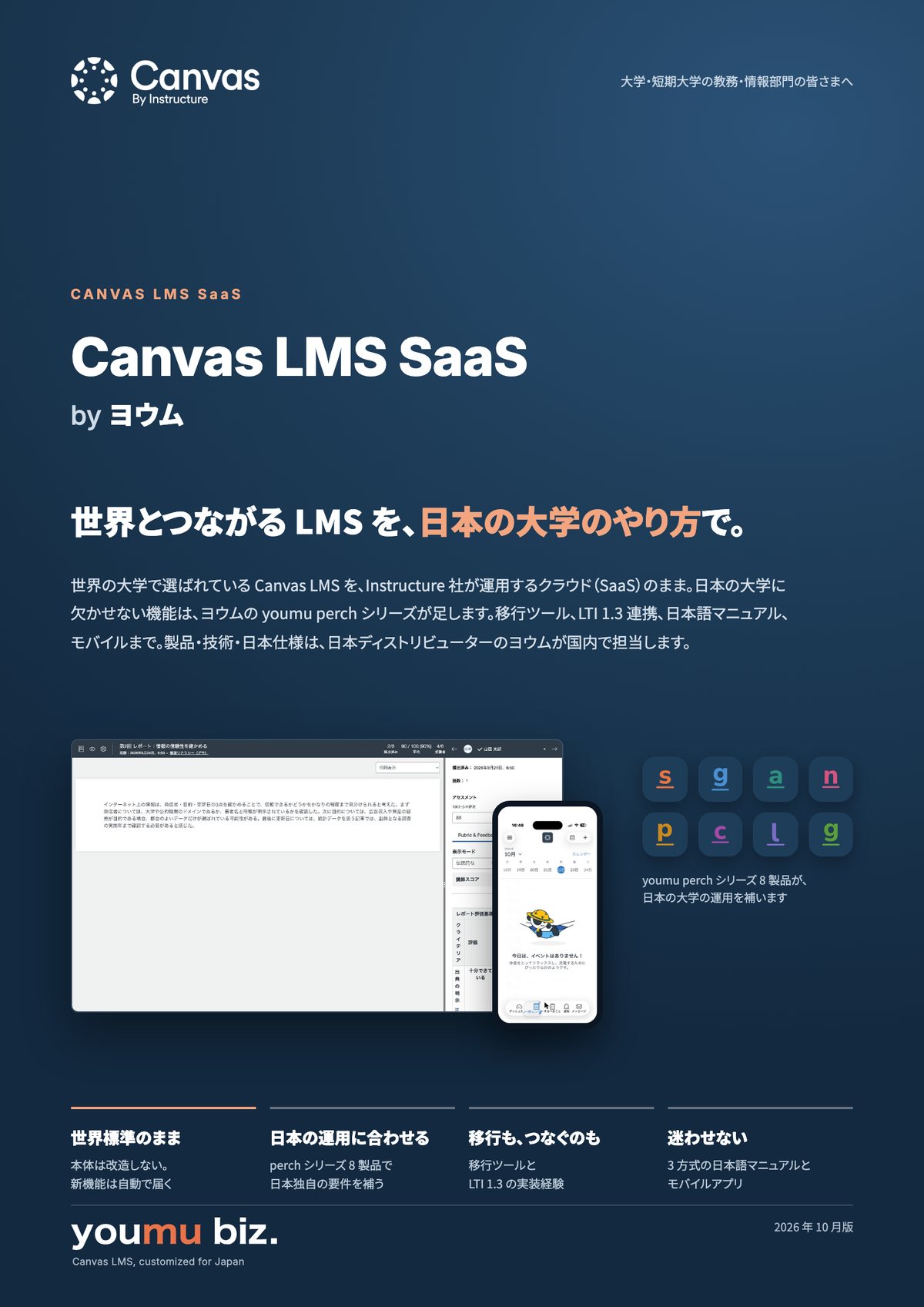
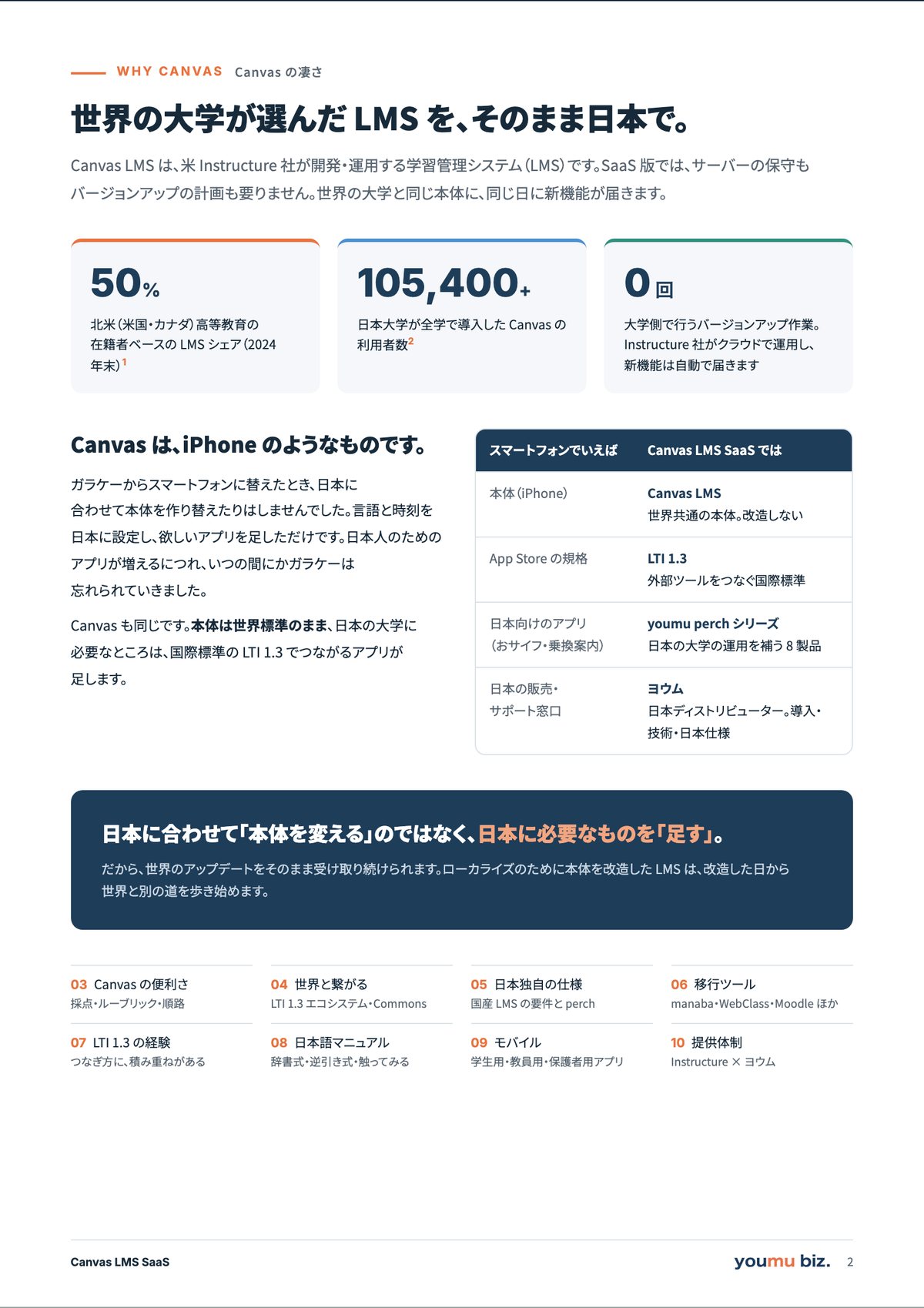
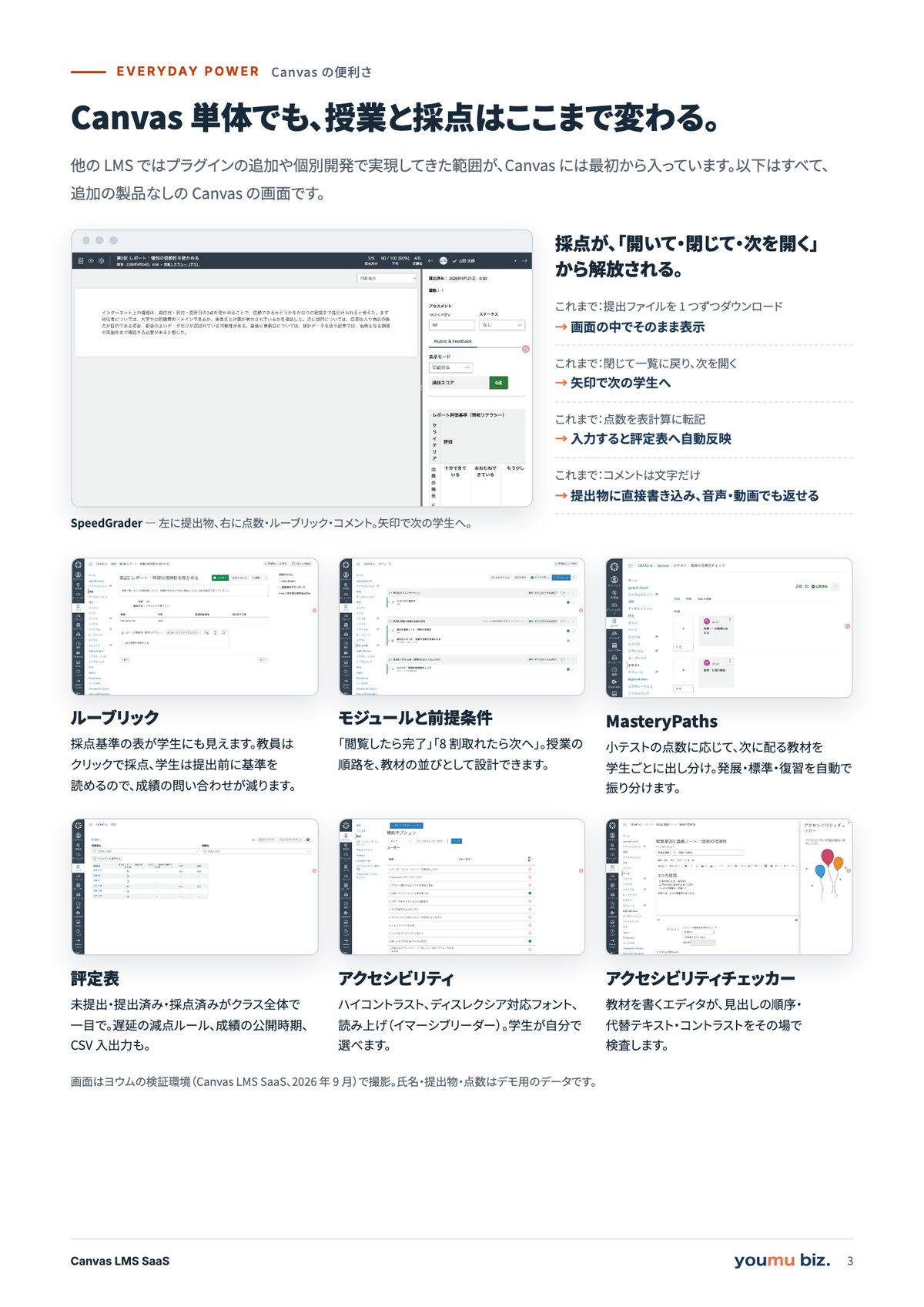
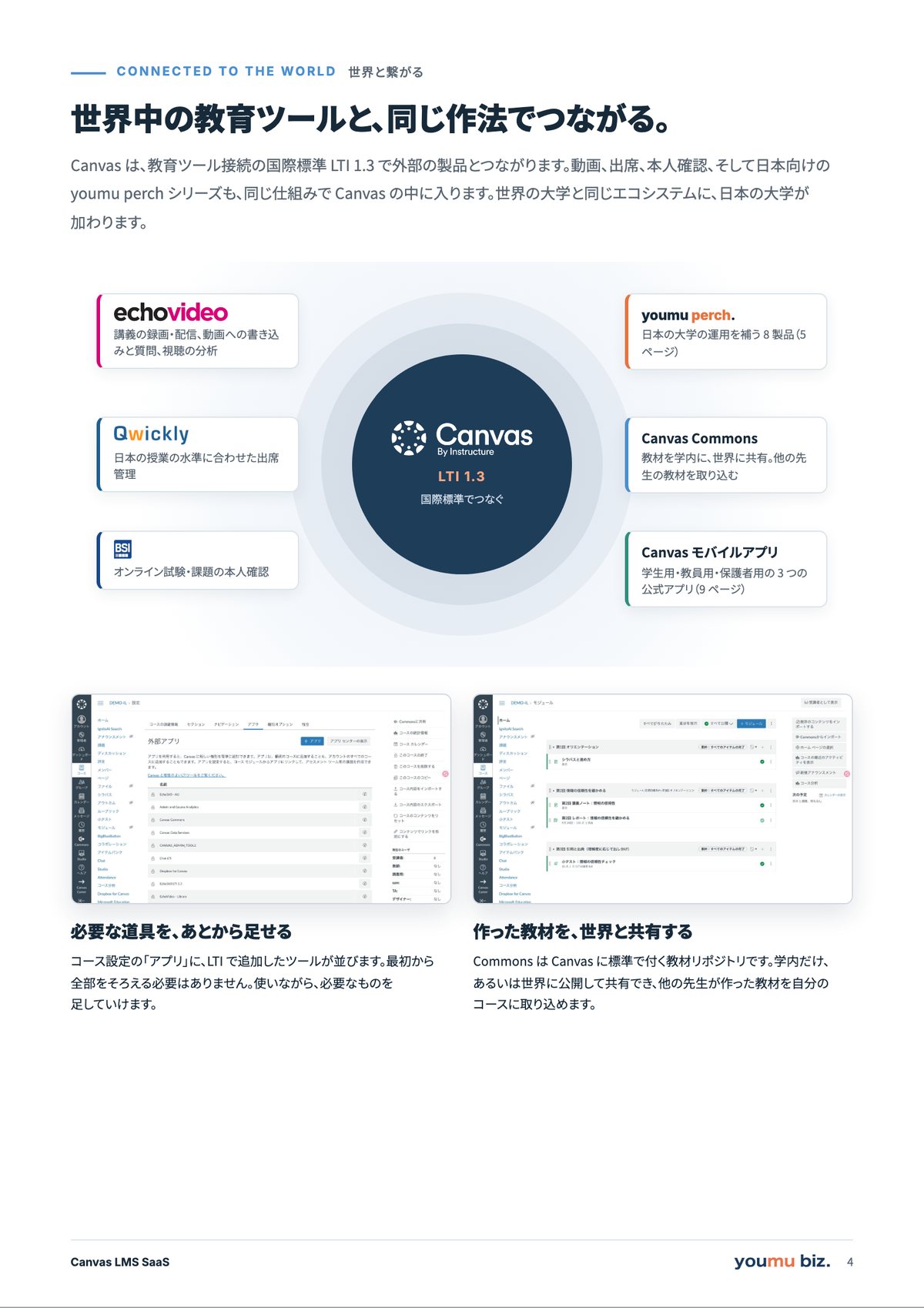
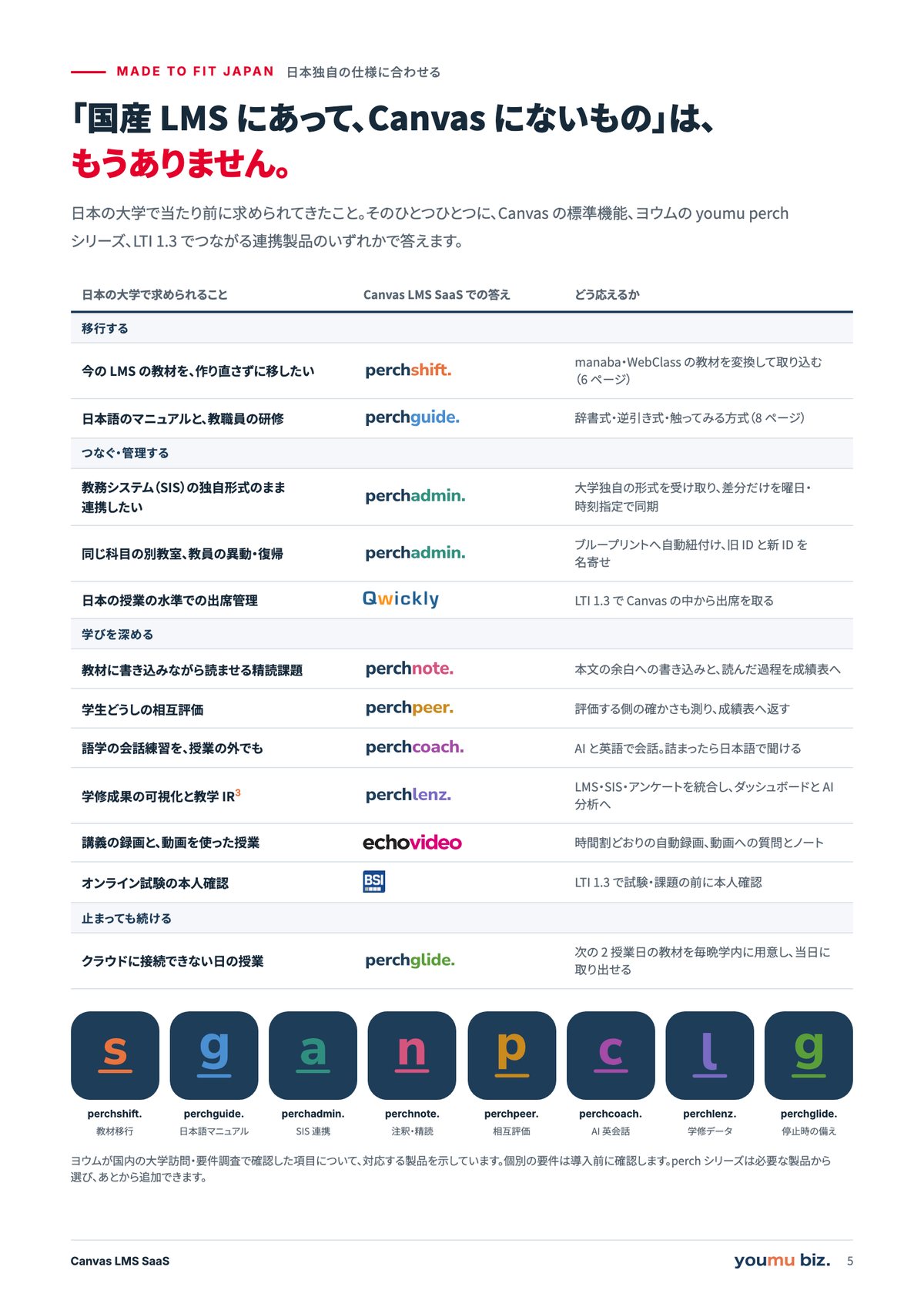
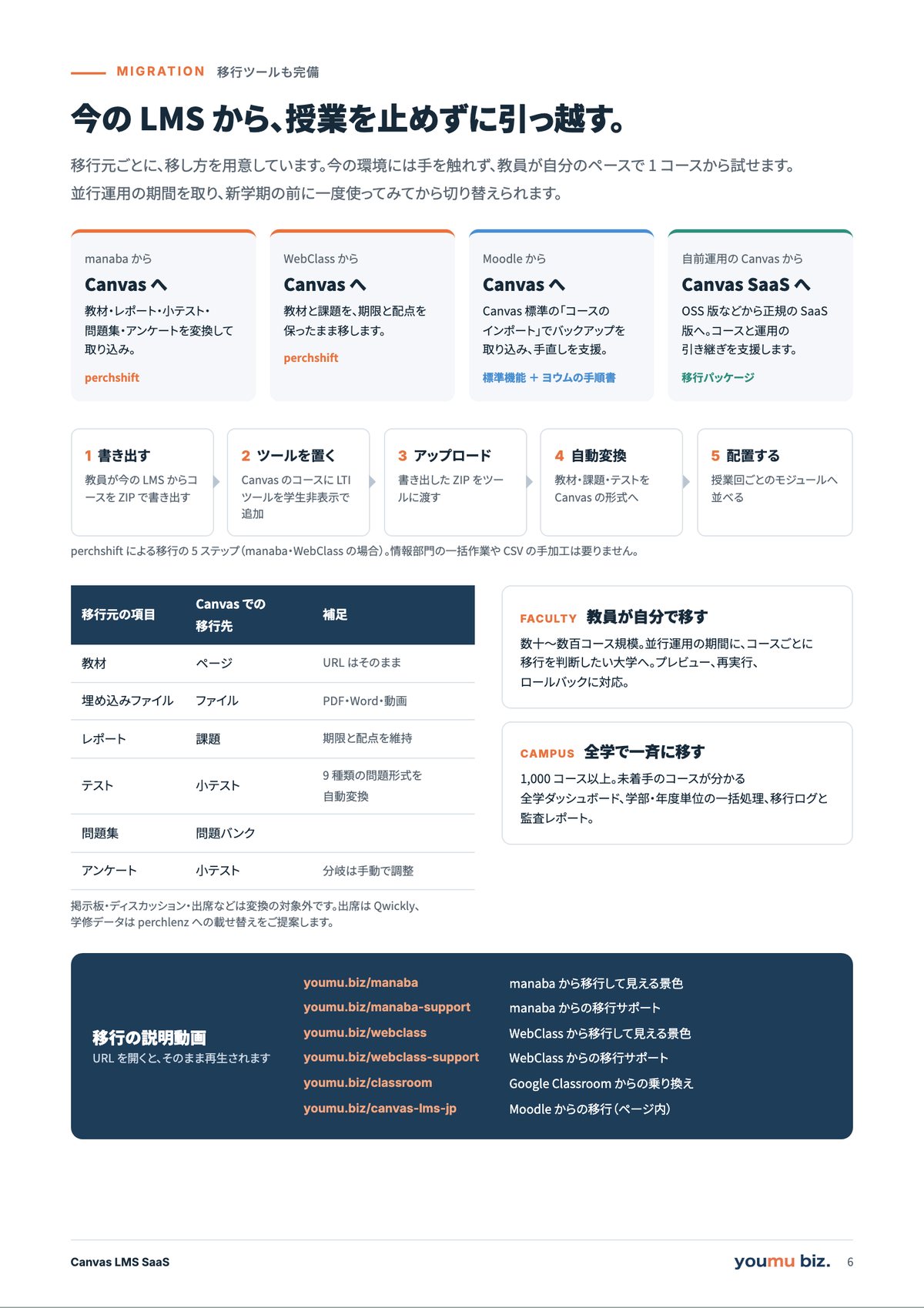
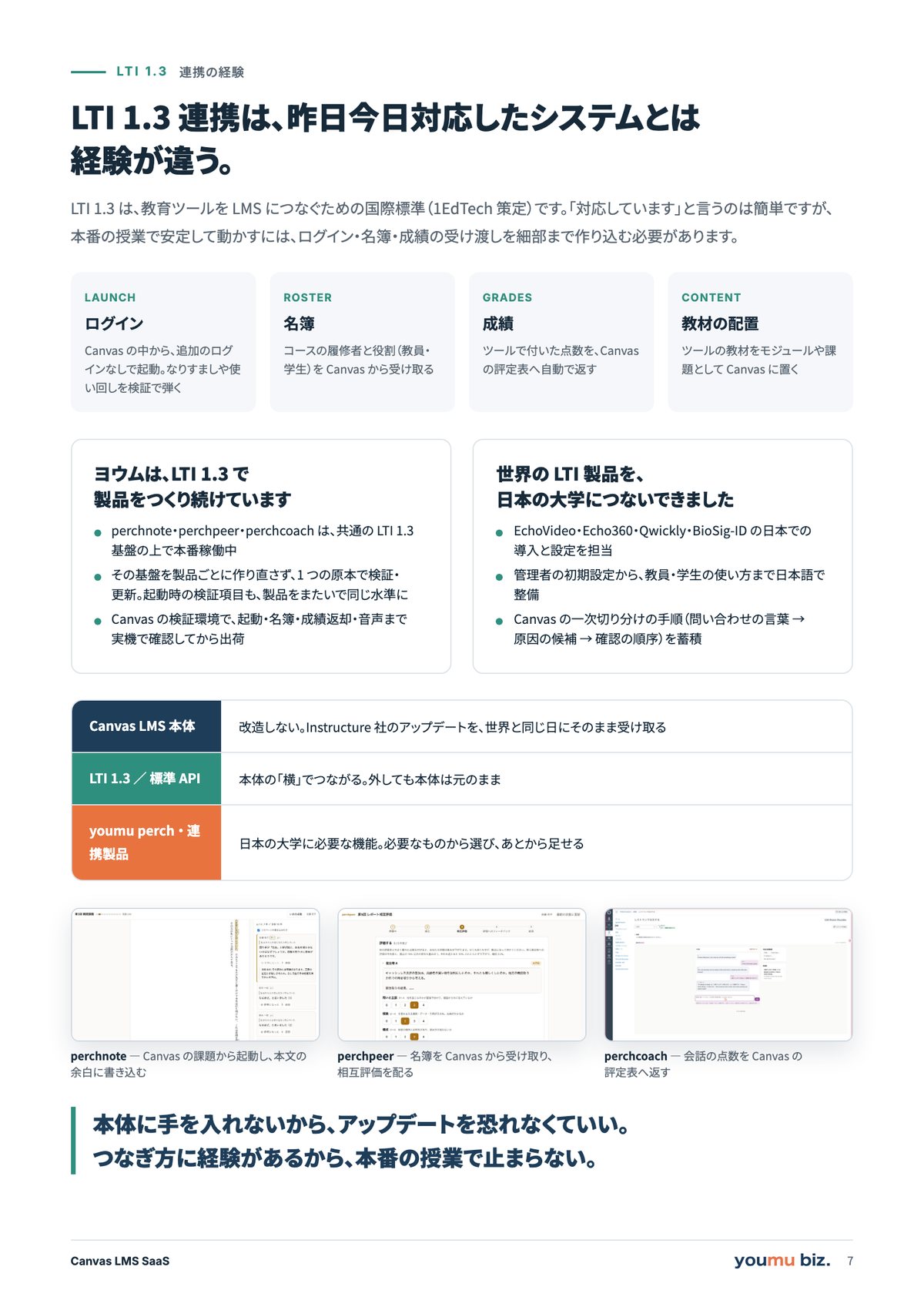
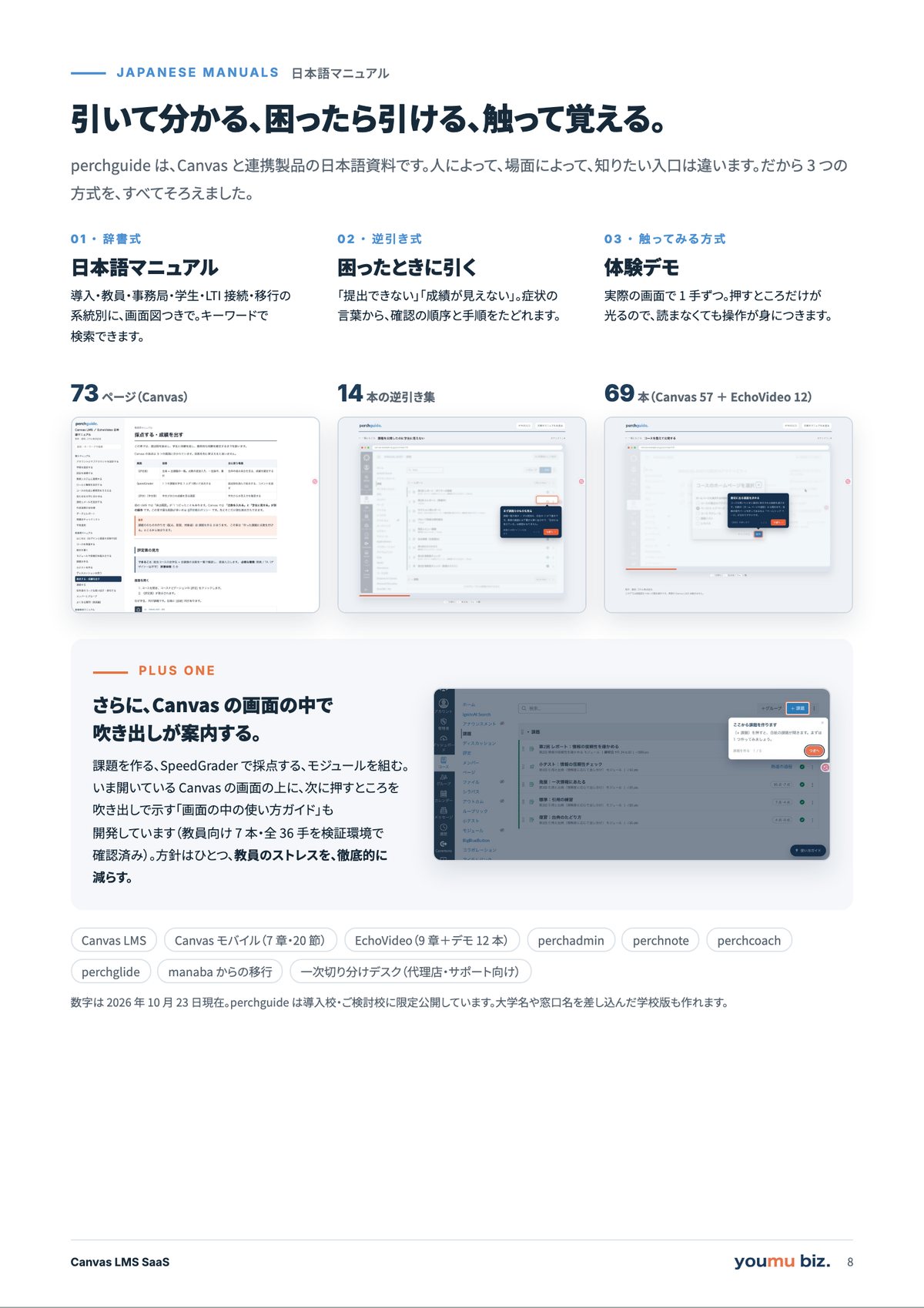
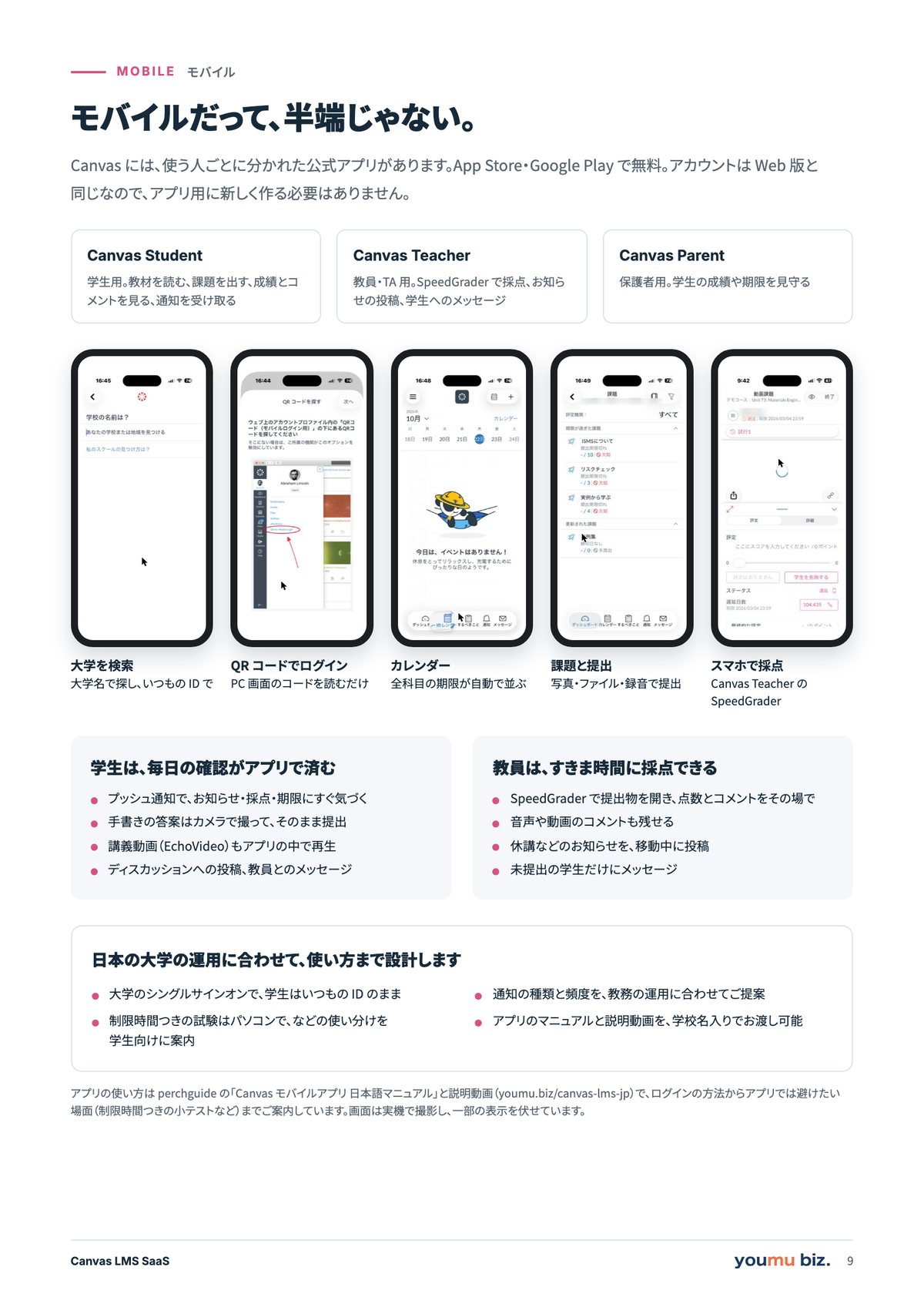
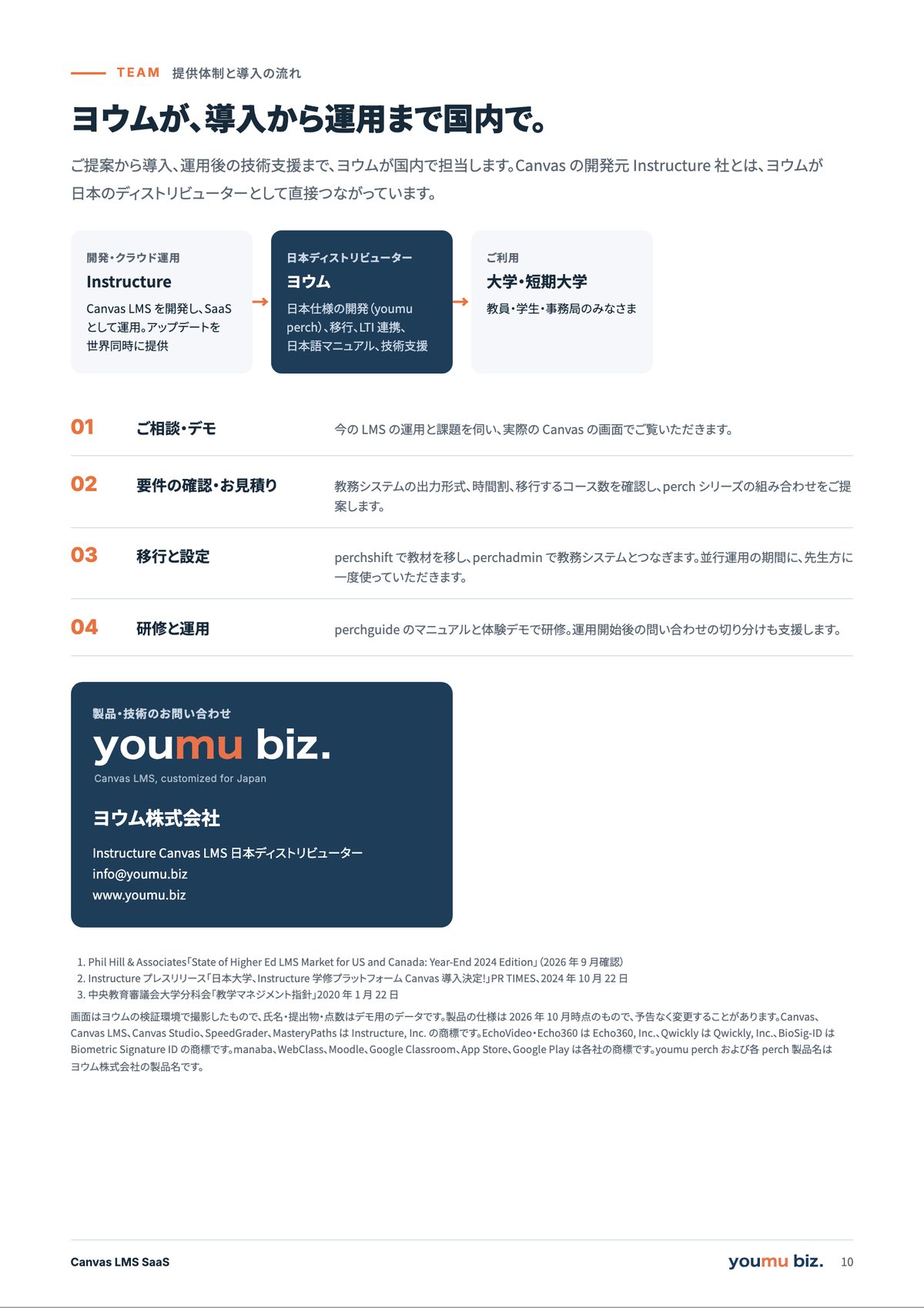
学内での回覧・印刷にそのままお使いいただけます
Try it
3 分で、採点を体験してみる。Try it: grading in three minutes.
実際の Canvas の画面を並べています。光っているところをクリックすると、次の画面に進みます。マウスが使えない場合も、Tab キーと Enter キーだけで進められます。These are real Canvas screens. Click the highlighted spot to move to the next one — or use Tab and Enter if you are not using a mouse.
画面はヨウムの検証環境(Canvas SaaS、2026 年 9 月)で撮影した実物です。氏名・提出物・点数はデモ用のデータです。Real screens from Youmu’s Canvas SaaS test environment (September 2026); names, submissions and scores are demo data.
Why Canvas
Canvas 単体でも、
授業と採点はここまで変わる。Even on its own, Canvas changes teaching and grading.
ここから先は、Canvas LMS を素のまま使ったときの画面です。ヨウムの検証環境(Canvas SaaS、2026 年 9 月)で撮影しました。日本の大学で長く使われてきた LMS や、Moodle のようなオープンソース LMS では、プラグインの追加や個別の開発で実現してきた範囲が、Canvas には最初から入っています。The screens below are Canvas LMS as it comes, captured in Youmu’s Canvas SaaS test environment in September 2026. Much of what other LMSs in Japan — or open-source platforms like Moodle — cover with plugins or custom development is built into Canvas from the start.
採点が、「開いて・閉じて・次を開く」から解放される。SpeedGrader — grading without opening and closing files
提出物は画面の中にそのまま表示されます。ダウンロードは要りません。矢印で次の学生へ進み、一覧に戻る必要もありません。点数はその場で入力すると評定表に自動で入り、残り何人かが常に表示されます。コメントは提出物の上に直接書き込め、音声や動画でも返せます。Submissions open inside the screen — no downloading. Arrow to the next student without going back to a list. Scores go straight into the gradebook, the remaining count is always visible, and feedback can be written on the work itself or recorded as audio or video.
- これまで:提出ファイルを1つずつダウンロードして開く / Canvas:画面の中でそのまま表示Before: download each file. Canvas: opens in place
- これまで:閉じて一覧に戻り、次を開く / Canvas:矢印で次の学生へBefore: back to the list each time. Canvas: arrow to the next student
- これまで:点数を手元の表計算に転記 / Canvas:その場で入力し、評定表へ自動反映Before: retype scores into a spreadsheet. Canvas: enter once, it lands in the gradebook
- これまで:何人採点したか自分で数える / Canvas:残り人数が常に表示Before: count what’s left yourself. Canvas: the count is always on screen
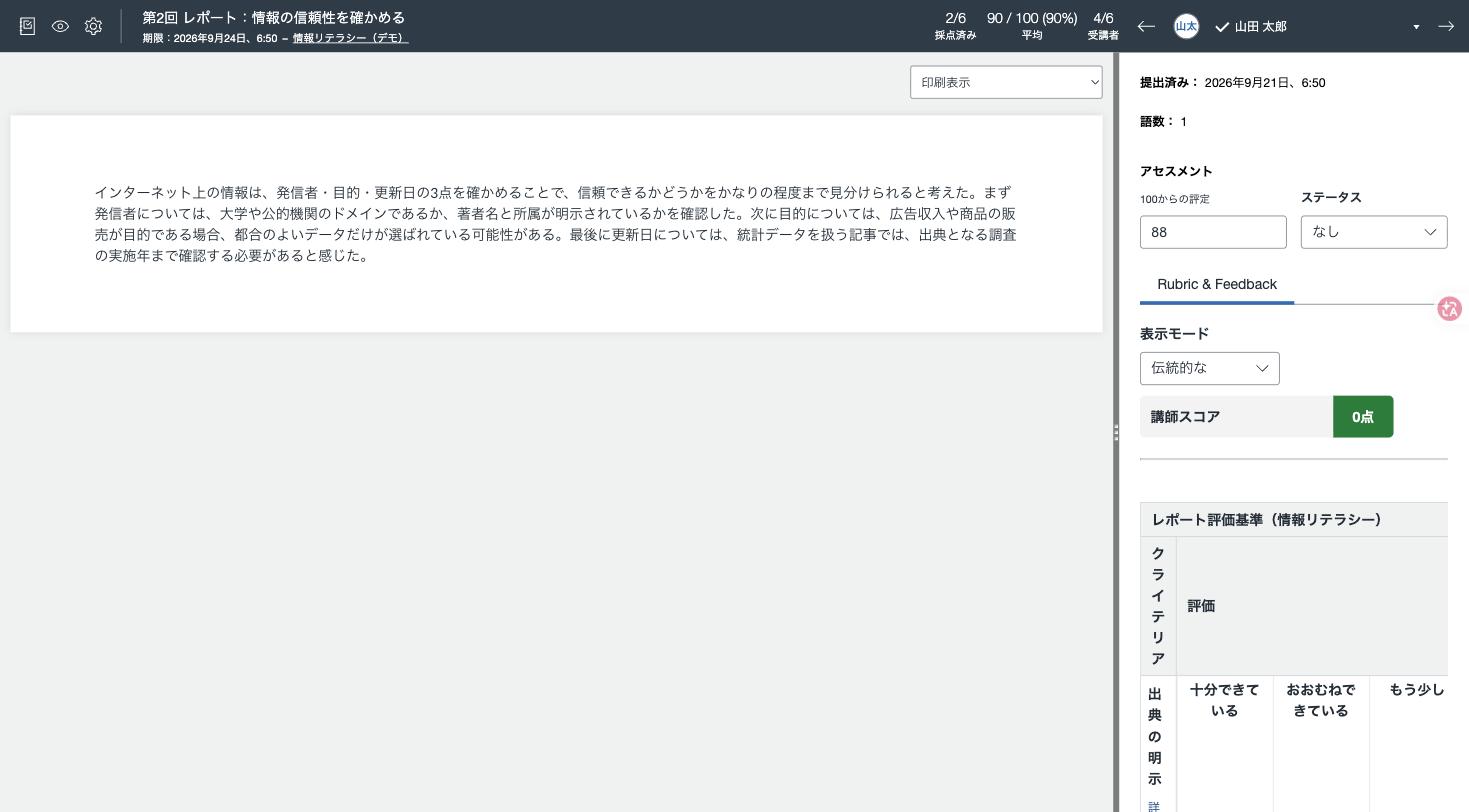
SpeedGrader — 左に提出物、右に点数・ルーブリック・コメント。上部の矢印で次の学生へ。SpeedGrader — submission on the left; score, rubric and comments on the right.
「なぜこの点数か」を、採点の前に示しておく。Rubrics — the criteria are visible before the work is graded
採点基準を表にしておくと、同じ表が学生の画面にも出ます。教員は当てはまる欄をクリックするだけで点数が入り、学生は提出前に基準を読めます。結果として、成績についての問い合わせが減ります。Set the criteria out as a table and students see the same table. Teachers click the matching level to score; students read the standard before they submit — and questions about grades drop.
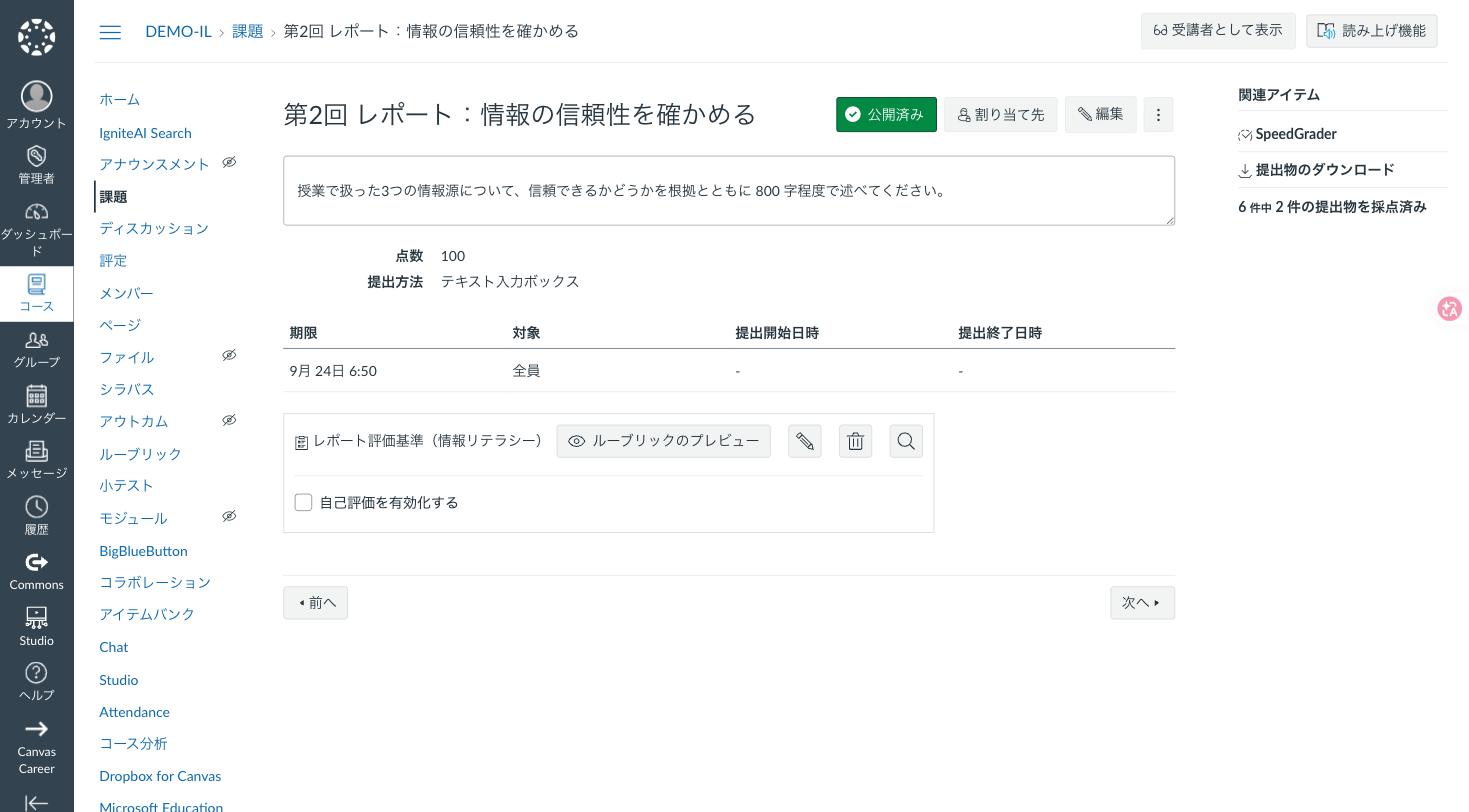
課題にルーブリックを添えた状態。右上の「読み上げ機能」からイマーシブリーダーも開けます。An assignment with its rubric attached; the reader button sits at the top right.
授業の順路を、教材の並びとして設計できる。Modules, requirements and prerequisites
モジュールごとに「閲覧したら完了」「提出したら完了」「小テストで 8 割取ったら完了」といった要件を決められます。前の回を終えるまで次の回を開かせない、という前提条件も設定できます。さらに MasteryPaths を使うと、小テストの結果に応じて、次に配る教材を学生ごとに変えられます。Each module can require viewing, submitting, or scoring above a threshold, and modules can be locked until the previous one is complete. With MasteryPaths, what comes next can differ per student depending on quiz results.
- 要件:閲覧・提出・最低点(例:10 点中 8 点)Requirements: view, submit, or a minimum score
- 前提条件:前の回を終えるまで開かないPrerequisites: the next module stays locked
- MasteryPaths:理解度に応じて次の教材を出し分けMasteryPaths: the next material adapts to the result
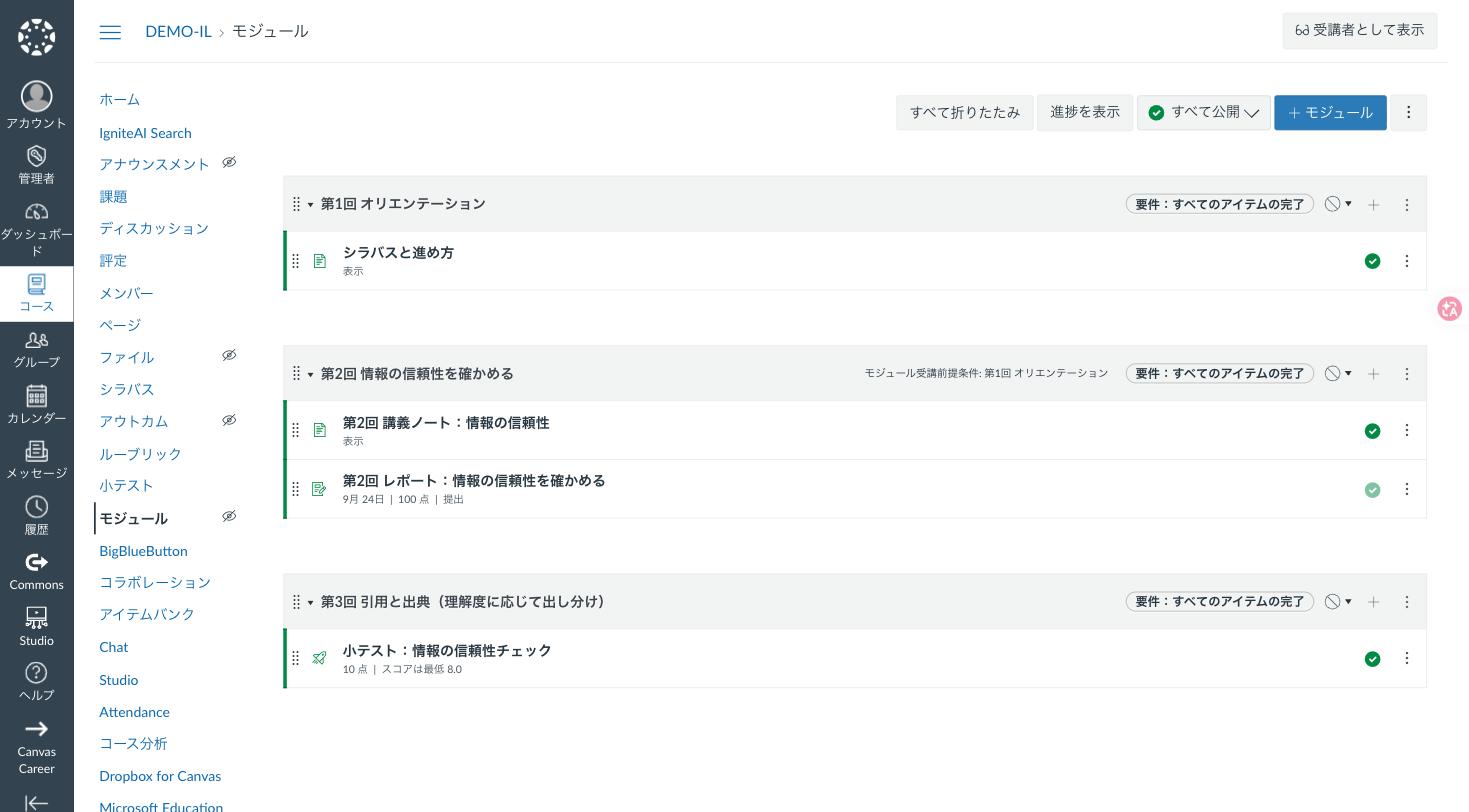
モジュールに前提条件(第1回の完了)と要件(すべてのアイテムの完了、小テストは最低 8.0 点)を設定した状態。Modules with a prerequisite and completion requirements, including a minimum quiz score.
理解度に応じて、次の教材を出し分ける。MasteryPaths — the next material adapts to the result
小テストの点数を 3 つの区分に分け、区分ごとに次に配る教材を決めておきます。学生は自分の結果に応じた教材だけを受け取ります。下の画面は、10 点満点の小テストで「10〜7 点は発展課題」「7〜4 点は標準課題」「4〜0 点は復習課題」と設定したところです。Split the quiz score into three bands and decide what each band receives next. Students only see the material that matches their result — here, 10–7 points get an advanced task, 7–4 the standard one, 4–0 a review task.
- 区分ごとに複数の教材をまとめて配ることもできますEach band can hand out more than one item
- 教員が採点した課題や、小テストの結果を起点にできますAny graded item can be the trigger
- アカウント設定の「熟達の過程」を有効にすると使えますEnable “Mastery Paths” in the account settings to use it
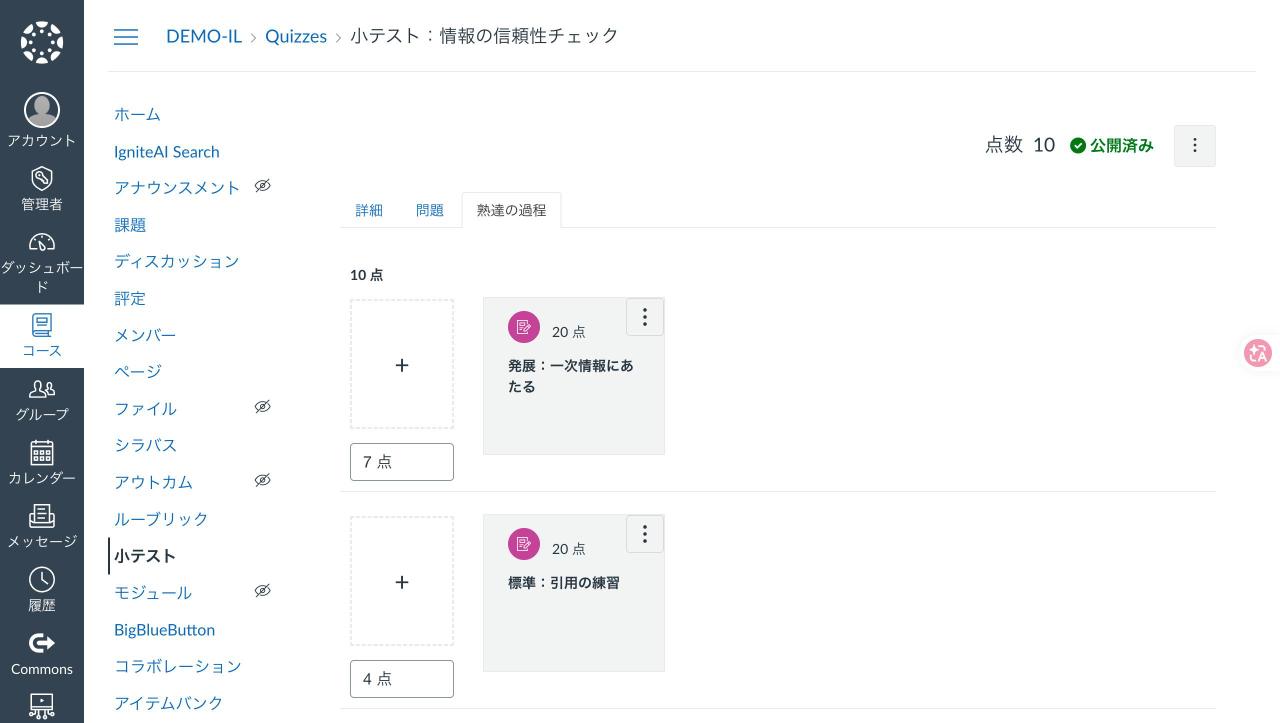
小テストの点数で次の教材を出し分ける設定。10〜7 点=発展、7〜4 点=標準、4〜0 点=復習。Setting up score bands: 10–7 advanced, 7–4 standard, 4–0 review.
提出状況が、クラス全体で一目でわかる。The gradebook shows the whole class at a glance
未提出・提出済み・採点済みが記号で並びます。遅延提出の減点ルールや、成績をいつ学生に見せるか(公開のタイミング)も設定でき、CSV の入出力にも対応します。Not submitted, submitted and graded are shown as icons across the class. Late policies and when grades become visible are configurable, and the gradebook imports and exports CSV.

評定表。採点済みは点数、未採点は提出アイコンで表示されます。The gradebook: scores where graded, submission icons where not.
学生も教員も、スマートフォンのアプリで。Apps for students, teachers and guardians
Canvas には学生用・教員用・保護者用の 3 つの公式アプリがあり、App Store と Google Play で配布されています。教員はスマートフォンで採点でき、学生は通知を受け取って提出もできます。設定画面に表示される QR コードを読み取れば、その場でログインできます。Canvas ships with three official apps — for students, teachers and guardians — on the App Store and Google Play. Teachers can grade from a phone, students get notifications and submit, and a QR code in the settings logs you in on the spot.
- Canvas Student/Canvas Teacher/Canvas ParentCanvas Student, Canvas Teacher and Canvas Parent
- モバイルログイン用の QR コードでその場でサインインA QR code in the settings signs you in immediately
- アプリの画面は、ここでは掲載していませんApp screens are not shown on this page
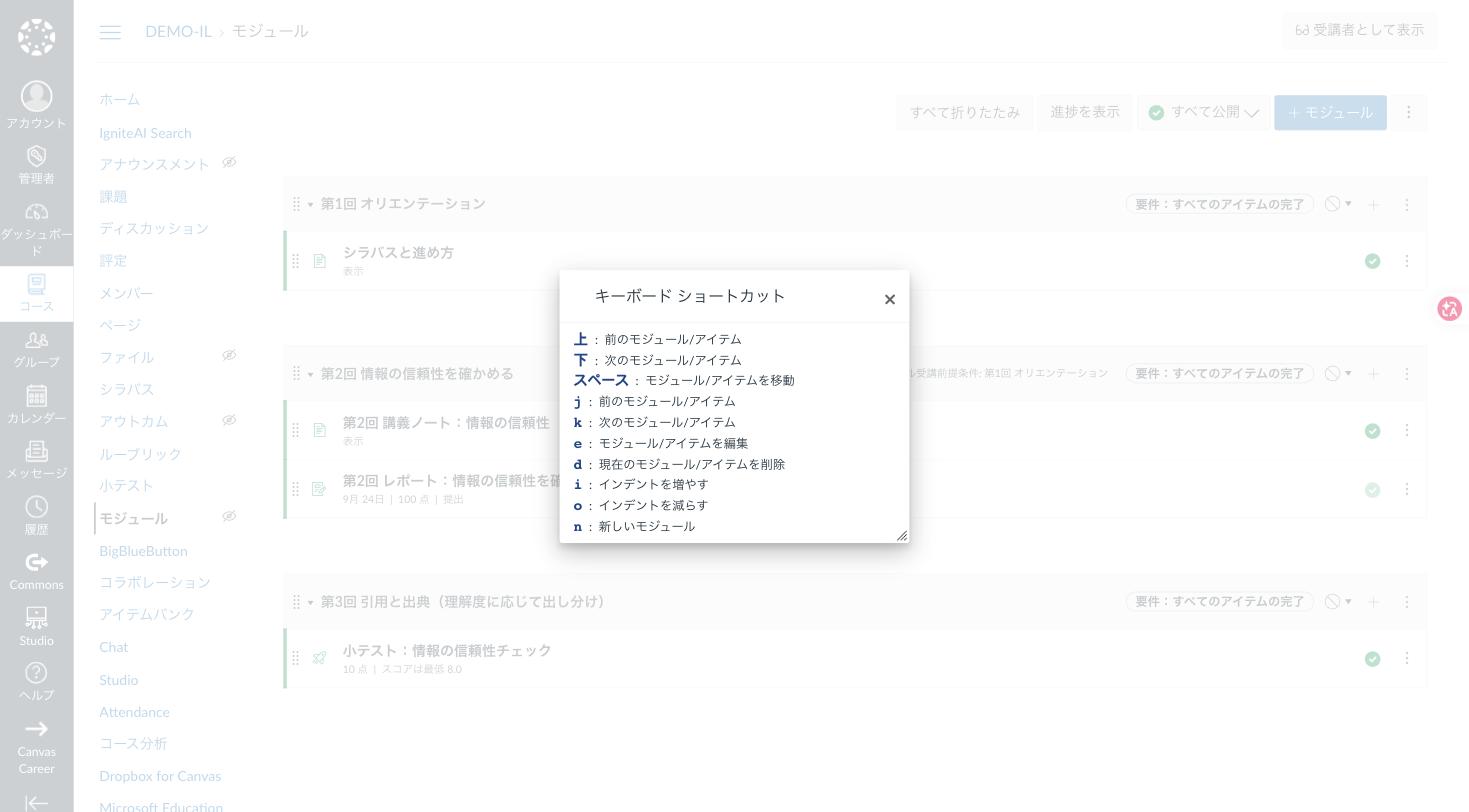
キーボードショートカット一覧(「?」キーで表示)。画面の操作は、マウスがなくても完結します。The keyboard shortcut list, opened with the “?” key.
作った教材を、学内と世界に共有する。Commons — the built-in content library
Commons は Canvas に標準で付く教材リポジトリです。コースや教材を、学内だけに、あるいは世界に公開して共有でき、ほかの先生が作った教材を自分のコースに取り込めます。コースの画面右にある「Commons からインポート」「Commons に共有」から使います。Commons is the content library that comes with Canvas. Share a course or a single item with your institution or the world, and import what other teachers have made — straight from the course sidebar.
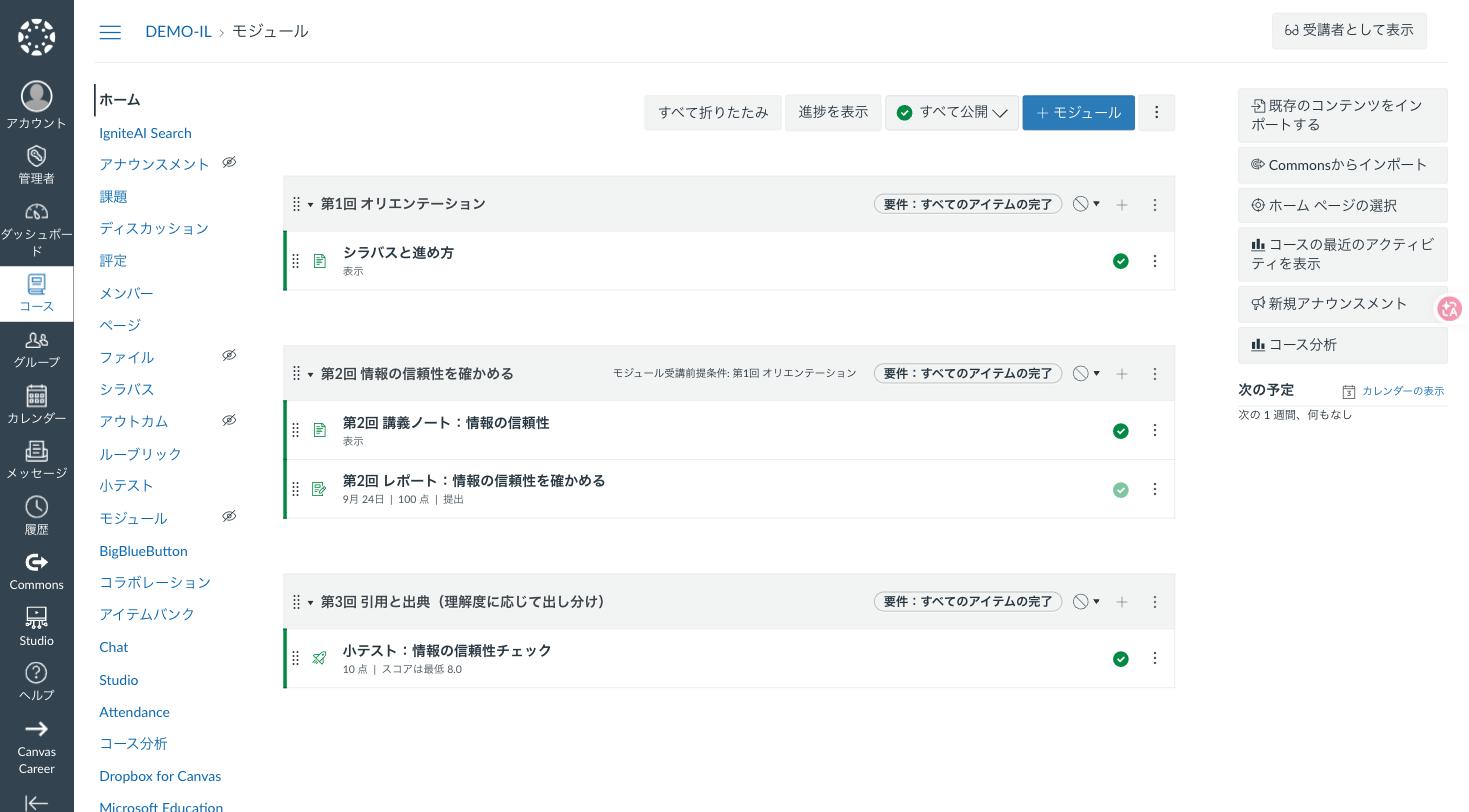
コースの右メニューから Commons へ共有・Commons からインポートができます。Share to Commons and import from Commons, from the course sidebar.
必要な道具を、あとから足せる。An ecosystem you extend with LTI 1.3
Canvas は LTI 1.3 で外部ツールとつながります。動画の Echo360・EchoVideo、出席の Qwickly、本人確認の BioSig-ID、そしてヨウムの youmu perch シリーズも、この仕組みで Canvas の中に入ります。アプリの一覧から追加でき、Canvas に対応したツールは Edu App Center に並んでいます。Canvas connects to outside tools through LTI 1.3 — Echo360 and EchoVideo for video, Qwickly for attendance, BioSig-ID for identity, and Youmu’s own youmu perch series. Tools are added from the apps list, and the Edu App Center lists what works with Canvas.
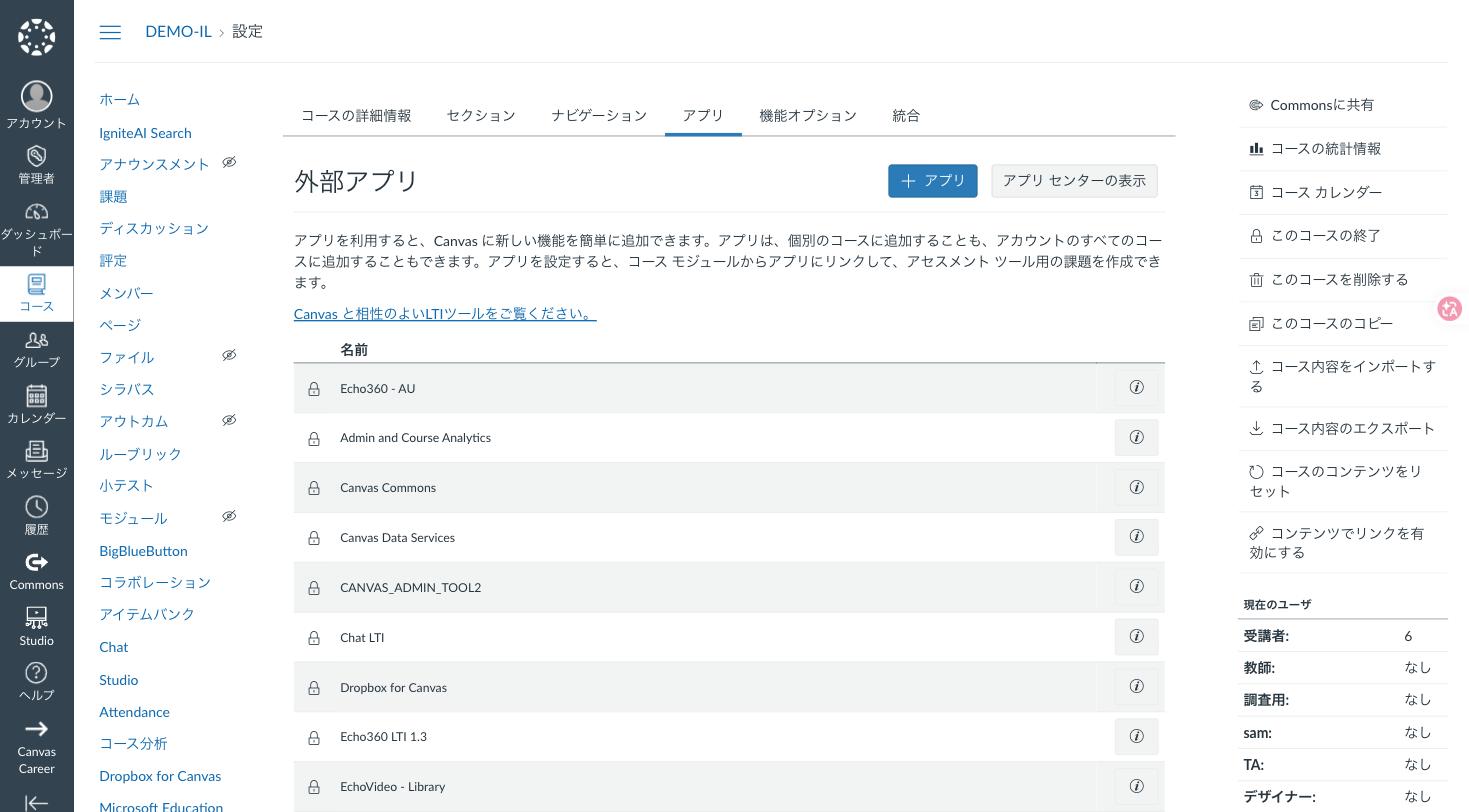
コース設定の「アプリ」。LTI で追加したツールが並びます。The apps tab in course settings, listing the LTI tools in place.
Accessibility
どの学生も、同じ教材にたどり着ける。Every student reaches the same material.
視覚・聴覚・読み書き・運動に困難のある学生のための機能が、Canvas には標準で入っています。学生が自分で表示を選べること、読み上げやキーボードだけで操作できること、そして教材を作る側が問題に気づけること。この 3 つがそろっています。Instructure は Canvas について VPAT を公開し、WCAG 2.1 AA への準拠を表明しています。Support for students with visual, hearing, reading or motor difficulties is built into Canvas: students choose how things look, everything can be read aloud or driven from the keyboard, and the people making the material are told when something is wrong. Instructure publishes a VPAT for Canvas and states conformance with WCAG 2.1 AA.
学生が、自分に合う表示を選べる。Students choose the display that suits them
ユーザー設定の「機能オプション」から、学生自身が表示を切り替えられます。教員や情報システム部門の作業は要りません。Each student switches these on for themselves in their own settings — nothing for the teacher or IT team to do.
- ハイコントラストの UI / リンクに下線を引くHigh-contrast UI and underlined links
- ディスレクシア対応フォントを使用するA dyslexia-friendly typeface
- お祝いアニメーションを無効化する / アラート通知のタイムアウトを無効にするTurn off celebration animations; stop alerts from timing out
- クローズドキャプションの自動表示Show closed captions automatically
- キーボードショートカットを無効にする(支援技術との衝突を避けられます)Disable keyboard shortcuts when they clash with assistive technology
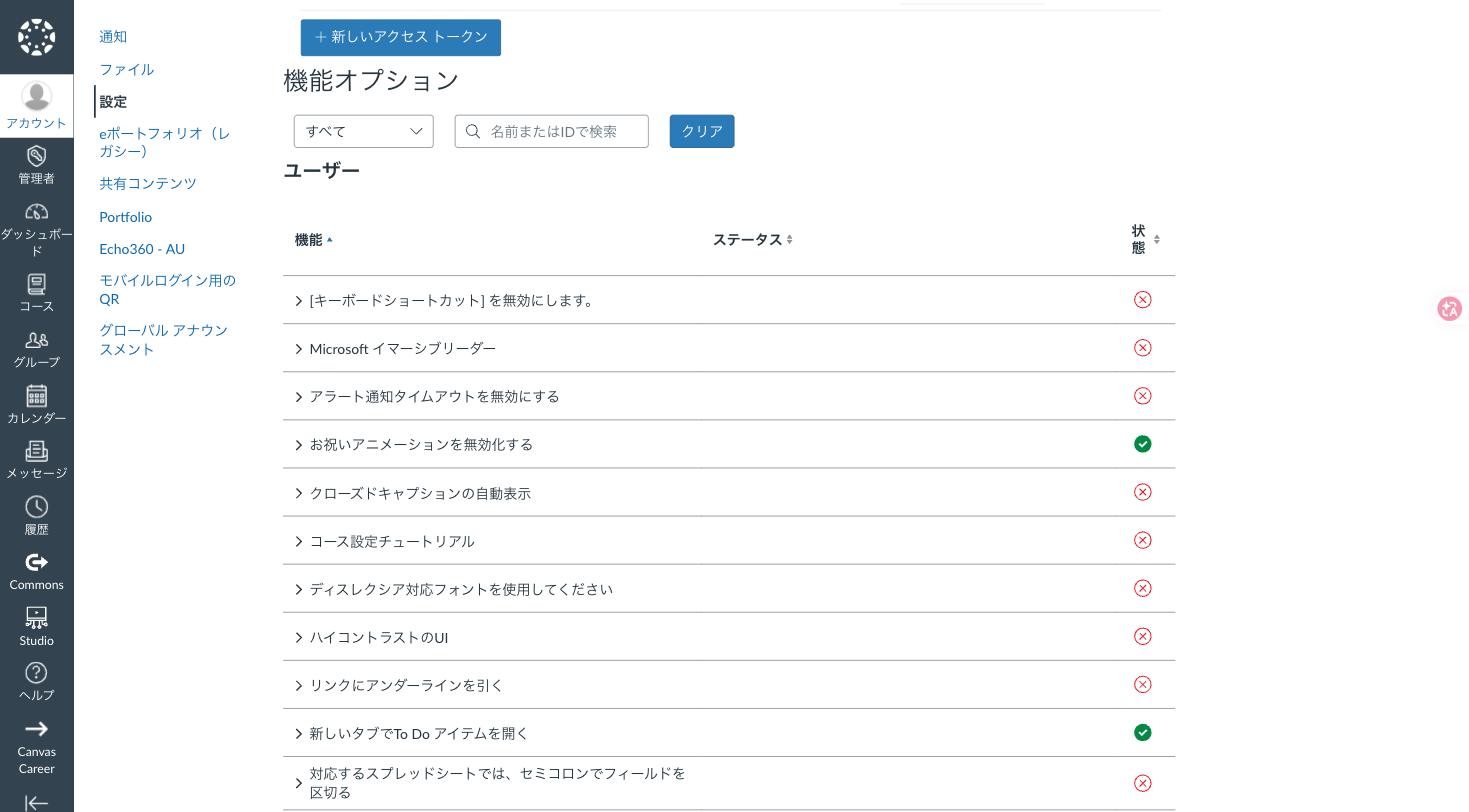
ユーザー設定の「機能オプション」。学生が自分で切り替えられます。The feature options in user settings — each student’s own switches.
読み上げと、キーボードだけの操作。Read aloud, and keyboard-only operation
ページや課題の「読み上げ機能」から Microsoft イマーシブリーダーが開き、本文の読み上げ、行のフォーカス、品詞の色分け、翻訳が使えます。画面の操作はキーボードだけで完結し、「?」キーでショートカットの一覧が出ます。各ページの先頭には「コンテンツまでスキップする」リンクがあり、スクリーンリーダーでの読み上げにも対応しています。The reader button opens Microsoft Immersive Reader — text read aloud, line focus, parts of speech in colour, translation. Everything can be driven from the keyboard, “?” lists the shortcuts, and every page starts with a skip-to-content link for screen readers.
課題やページの右上にある「読み上げ機能」からイマーシブリーダーが開きます。The reader button at the top right of pages and assignments.
教材を作る側が、その場で気づける。The editor checks the material as it is written
教材を書くエディタには、アクセシビリティチェッカーが組み込まれています。見出しの順序、画像の代替テキスト、表の見出し、文字と背景のコントラストなどを検査し、見つかった問題はその場で直せます。The rich content editor has an accessibility checker built in. It looks at heading order, image alt text, table headers and colour contrast, and lets the author fix what it finds without leaving the page.
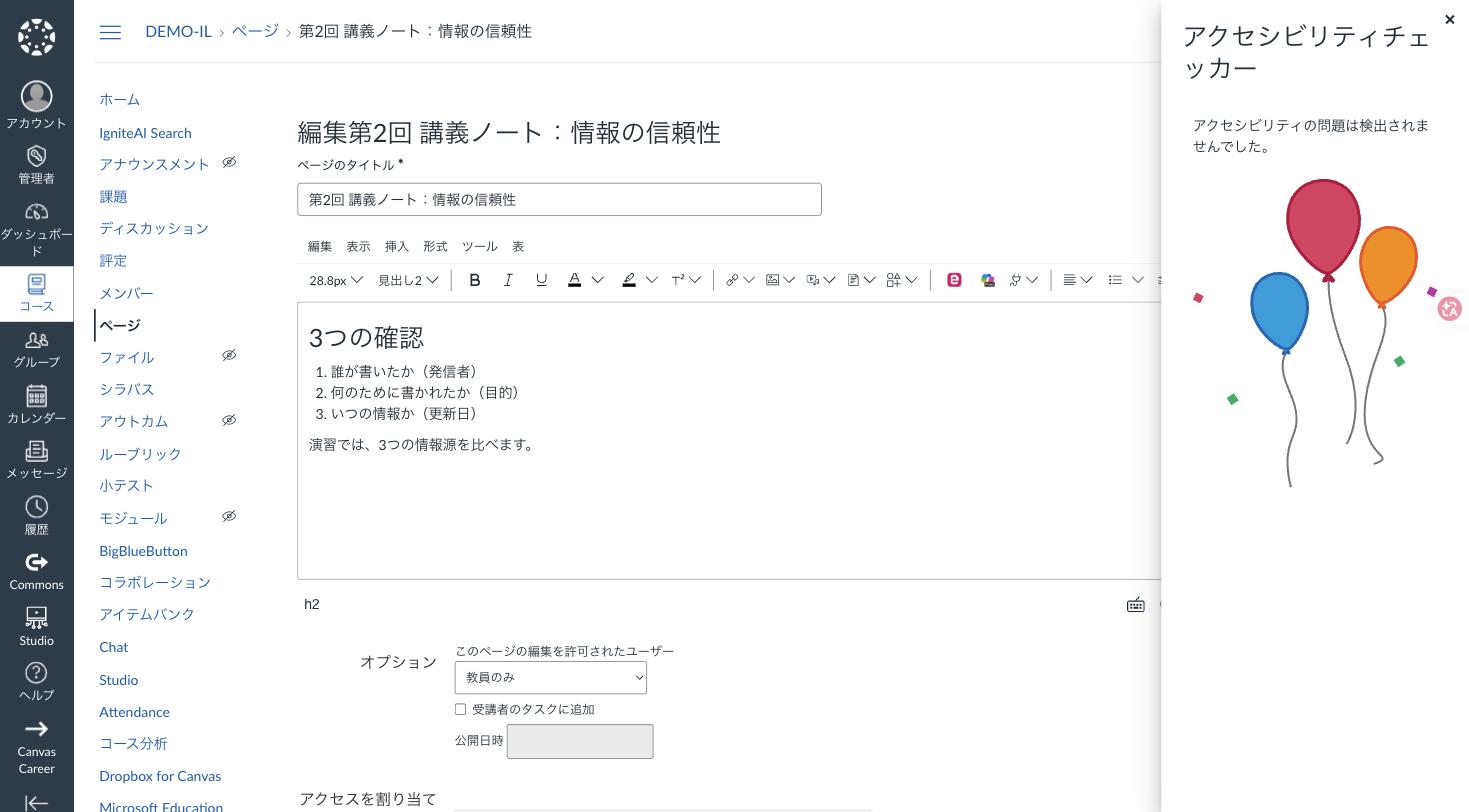
エディタのアクセシビリティチェッカー。問題が見つかれば、その場で修正できます。The accessibility checker beside the editor.
画面はすべて、ヨウムの検証環境(Canvas SaaS、2026 年 9 月)で撮影したものです。氏名・提出物・点数はデモ用のデータです。Canvas および Canvas LMS は Instructure, Inc. の商標です。All screens were captured in Youmu’s Canvas SaaS test environment in September 2026. Names, submissions and scores are demo data. Canvas and Canvas LMS are trademarks of Instructure, Inc.
Next
勇気を持ってガラケーからスマホに変えた時、
日本に合うように本体を変えたりしませんでした。When we took the leap to smartphones, nobody rebuilt the handset to suit Japan.
言語と時間を日本に設定して、欲しいアプリを足しただけです。
日本人が欲しいアプリがどんどん増えて、いつの間にかガラケーは忘れ去られてゆきました。We set the language and the clock to Japan, and simply added the apps we wanted. More and more apps arrived for Japan — and before long, the feature phone was forgotten.
Canvas も同じです。本体は世界標準のまま、日本の大学に必要なところは youmu perch が足します。Canvas works the same way: the core stays world-standard, and youmu perch adds what Japanese universities need on top of it.
perch Admin
日本の大学のまま、Canvas を使う。perch Admin — use Canvas and stay a Japanese university.
グローバル基準の Canvas はデータ構造がシンプルです。そのぶん、教務システム(SIS)ごとの独自項目、教室ごとの履修、教員の異動・復帰といった日本の大学の運用に、手作業が生まれます。perch Admin は、そのギャップを二つのエンジンで埋めるインテリジェンスブリッジです。Canvas keeps its data structure simple because it serves the world. That leaves manual work around SIS-specific fields, per-classroom enrollment and staff transfers. perch Admin closes the gap with two engines.
Engine 1 · Sync Service
データ連携エンジンThe data sync engine
SIS のユーザ・コース・履修を Canvas へ流すスマートパイプライン。A smart pipeline that carries users, courses and enrollments from your SIS into Canvas.
- 大学独自のフォーマットをそのまま受領・自動変換Accepts each university’s own format and converts it
- 全量から差分だけを抽出し、処理時間を最小にSyncs only what changed, keeping runs short
- 曜日・時刻の指定、定周期での実行Runs on chosen weekdays and times, or on a cycle
- 同一コンテンツ・別教室をブループリントへ自動紐付けLinks identical courses in different rooms to a Blueprint
Engine 2 · Functions Plus
機能拡張エンジンThe extension engine
マスターデータを perch Admin に持ち、LTI 1.3 で Canvas から起動。Holds master data in perch Admin and launches from Canvas via LTI 1.3.
- Custom Fields — 学部コード・身分・入学年度などの独自項目Custom Fields for faculty codes, status, entry year
- Emergency Override — 指定日まで SIS 更新をブロックEmergency Override blocks SIS updates until a set date
- Identity Master — 旧 ID と新 ID を名寄せし過去教材を復元Identity Master merges old and new IDs, restoring past materials

連携の流れHow a sync runs
- 受領Receive
SIS の独自フォーマットをそのまま受け取るTake the SIS export as it is
- 変換Convert
取り込める形へ自動変換し、マスターに保持Convert it and keep it as master data
- 抽出Extract
前回から変わった差分だけを切り出すPull out only what changed since last run
- 連携Sync
指定したタイミングで Canvas LMS へ反映Apply it to Canvas LMS on schedule
Evolution Matrix
Canvas 単独と、perch Admin あり。Canvas alone, and Canvas with perch Admin.
| 項目Area | Canvas LMS 単独Canvas alone | perch Admin ありWith perch Admin |
|---|---|---|
| データ統合Data integration | Canvas 指定の CSV フォーマットCanvas’s own CSV format | 大学独自の SIS フォーマットをそのまま受領Your SIS format, accepted as-is |
| 処理効率Processing | 全件データロード(重い・遅い)Full loads — heavy and slow | 差分抽出(軽い・速い)Changes only — light and fast |
| 科目管理Course setup | 教室ごとに手動で登録Registered room by room, by hand | ブループリント自動紐付けと教室別の自動分割Blueprint linking and per-room enrollment, automatic |
| ユーザ IDUser IDs | 復帰した職員は新 ID になり過去データと分断Returning staff get a new ID and lose their history | 名寄せで ID を統合し過去コンテンツへ復帰IDs merged; past content restored |
| データ制御Data control | 常に SIS の更新に同期Always overwritten by the SIS | 一時ブロックで緊急編集を守るTemporary lock protects urgent edits |
perchlenz
運営者の「創る自由」と、利用者の「使う喜び」を。perchlenz — freedom to build for staff, joy of use for students.
LMS・SIS・アンケート・研究データベースに散らばった学修データを一つに統合し、AI の分析と独自のダッシュボードへ。中教審「教学マネジメント指針」3が求める学修成果の可視化と教学 IR を、汎用 BI の限界を越えて実現します。Bring learning data scattered across the LMS, SIS, surveys and research databases into one place, then into AI analysis and dashboards of your own design — the outcome visibility and institutional research Japan’s Guidelines for Academic Management call for.

4 つの機能が回す、改善のサイクルFour capabilities, one improvement cycle
- データ統合Connect
DB・GA・スプレッドシート・CSV を SQL で横断集計。パラメータで条件も切り替えCross-source SQL over databases, GA, sheets and CSV, with parameters
- データ収集Create
LMS 特化の入力フォーム。提出物の紐付け、ルーブリック、ピア評価もLMS-native forms with linked submissions, rubrics and peer review
- AI の洞察Discover
傾向の可視化、特異値の自動検知、プラスとマイナスの要因分析Trends, automatic outlier detection, positive and negative factors
- UI・可視化Visualize
HTML/CSS/JS で独自ウィジェットを開発し、ドラッグ&ドロップで配置Build widgets in HTML/CSS/JS and arrange them by drag and drop
For faculty & staff
創る自由Freedom to build
テンプレートの範囲を超えて、欲しい画面をそのまま作れます。Build exactly the screens you need, beyond any template.
- SQL ビルダーで複数データソースをクロス集計SQL builder across data sources
- 入力フォームを作成し、本人記入・他者記入を指定して配布Build forms and assign self- or peer-entry
- アンケート集計ウィジェットで結果をすぐ共有Survey summary widget, ready to share
For students
使う喜びJoy of use
システムを行き来せず、ログインした瞬間に自分の状況が分かります。No hopping between systems — students see where they stand the moment they log in.
- 時間割・予定をダッシュボードで一覧Timetable and schedule on one dashboard
- システム横断の ToDo で提出・受験状況を把握Cross-system to-dos for submissions and exams
- 出席状況、振り返り、ショーケースのポートフォリオAttendance, reflections and a showcase portfolio
| 項目Area | 従来の BI・汎用ツールGeneric BI tools | perchlenz |
|---|---|---|
| データソースSources | 限られた接続方法Limited connectors | DB・GA・スプレッドシート・CSV に幅広く対応Databases, GA, sheets, CSV and more |
| 集計Aggregation | 定型的な集計どまりFixed reports | SQL エンジンで自由に指標を抽出Any metric, via a SQL engine |
| データ生成New data | 外部フォームとの連携が必要Needs external forms | LMS 特化のフォームで新しいデータを生成LMS-native forms generate it |
| AIAI | 別の BI・AI ツールが必要Needs a separate tool | 傾向・特異値・要因分析を自動で実行Trends, outliers and factors, automatically |
| 画面UI | テンプレートの範囲で構築Within templates | HTML/CSS/JS で独自 UI、ドラッグ&ドロップで配置Custom UI in code, placed by drag and drop |
CourseShift for Canvas
今の LMS から、授業を止めずに引っ越す。CourseShift — move off your current LMS without stopping classes.
manaba・WebClass の教材を、情報部門の一括作業や CSV の手加工なしで Canvas へ。教員が自分のペースで 1 コースから試せ、今の環境には手を触れません。Move manaba and WebClass course content to Canvas without bulk IT work or hand-edited CSVs. Faculty can start with a single course at their own pace, and your current environment stays untouched.

移行の 5 ステップFive steps to migrate a course
- 書き出すExport
教員が今の LMS からコースを ZIP で書き出すFaculty export the course as a ZIP
- ツールを置くAdd the tool
Canvas のコースに LTI ツールを学生非表示で追加Add the LTI tool, hidden from students
- アップロードUpload
書き出した ZIP をツールに渡すHand the ZIP to the tool
- 自動変換Convert
教材・課題・テストを Canvas の形式へ変換・登録Materials, assignments and tests are converted
- 配置するArrange
授業回ごとのモジュールへ教員が並べるFaculty place items into weekly modules
| 移行元の項目Source item | Canvas での移行先In Canvas | 補足Note |
|---|---|---|
| 教材Materials | ページPage | URL はそのままLinks kept as-is |
| 埋め込みファイルEmbedded files | ファイルFile | PDF・Word・動画PDF, Word, video |
| レポートReports | 課題Assignment | 期限と配点を維持Deadlines and points kept |
| テストTests | 小テスト(Classic)Classic Quiz | 9 種類の問題形式を自動変換Nine question types auto-converted |
| 問題集Question sets | 問題バンクQuestion Bank | |
| アンケートSurveys | 小テストQuiz | 分岐は手動で調整Branching adjusted by hand |
Faculty edition
FACULTY — 教員が自分で移すFaculty migrate their own courses
数十〜数百コース規模。並行運用期間に、コースごとに移行を判断したい大学へ。プレビュー、再実行、ロールバックに対応。Tens to hundreds of courses. For parallel-run periods and course-by-course decisions, with preview, re-run and rollback.
Campus edition · 推奨
CAMPUS — 全学で一斉に移すMigrate campus-wide
1,000 コース以上。未着手コースが分かる全学ダッシュボード、学部・年度単位の一括処理、移行ログと監査レポート。1,000+ courses. A campus dashboard of courses not yet started, batch runs by department or year, logs and audit reports.
掲示板・ディスカッション・出席・コースニュース・LTI の移行は現在対象外です。出席は Qwickly、学修データは perchlenz への載せ替えをご提案します。Bulletin boards, discussions, attendance, course news and LTI links are not migrated yet. We move attendance to Qwickly and learning data to perchlenz instead.
Canvas Mobile
Canvas モバイルについてAbout the Canvas mobile apps
学生は Canvas Student、
毎日の確認はアプリ、
- 013 つのアプリの違い
- 02ログイン(QR コードでのログインと注意)
- 03学生の使い方 — 写真での提出まで
- 04通知が届かないときの確認
- 05アプリでは避けたい場面
- 06教員の使い方 — SpeedGrader で採点
約 4 分 / 音声あり
From Classroom
Google Classroom からの乗り換えが心配な大学様へFor universities hesitating to move from Google Classroom
授業に配るところまでは足りていても、
この動画だけを共有する: youmu.biz/classroomShare just the video: youmu.biz/classroom
- 成績簿が重み付けまで自動計算The gradebook does the weighting.
- 小テストは作って配るところまで一続きQuizzes, from building to handing out.
- 遅延のペナルティを決めておけるLate penalties, decided in advance.
- 動画に書き込みながら進める授業Classes that write in the margins of the video.
From WebClass
WebClass からの移行をお考えの大学様へFor universities considering a move from WebClass
移行したあとに何が変わるのか、
準備と採点にかけていた時間が、
約 4 分 / 音声あり / 動画だけを共有する: youmu.biz/webclass
教材をどう運ぶか、
約 3 分 / 音声あり / 動画だけを共有する: youmu.biz/webclass-support
From manaba
manaba からの移行をお考えの大学様へFor universities considering a move from manaba
移行したあとに何が変わるのか、
移行は、ゴールではなく「離陸」。
- VIEW 01授業が変わる
- VIEW 02AI が授業の相棒になる
- VIEW 03動画が学びになる
- VIEW 04学生の迷いが消える
- VIEW 05世界とつながる
- VIEW 06大学全体が見渡せる
約 6 分 / 音声あり / 動画だけを共有する: youmu.biz/manaba
教材の作り直し、
- 解決 1教材の移行
- 解決 2履修データ
- 解決 3進め方 — 新学期の前に、一度使ってみる
- 解決 4定着
約 3 分 / 音声あり / 動画だけを共有する: youmu.biz/manaba-support
From Moodle
Moodle からの移行をお考えの大学様へFor universities considering a move from Moodle
何が移せて、
移るのは「教材」、
- 01全体像 — 移せるもの・移せないもの
- 02何が何になるか(対応表)
- 03小テストと問題バンクの手直し
- 04移行の 4 ステップ
- 05公開前に確認する 6 点
- 06科目数が多いときの進め方
約 5 分半 / 音声あり
ログインも名簿も、
- 01仕組み — LTI 1.3 が運ぶ 4 つのもの
- 02管理者の初期設定
- 03時間割どおりの自動録画と公開
- 04モジュールに講義動画を並べる
- 05学生の使い方
- 06分析と成績
約 4 分 / 音声あり
FAQ
よくあるご質問Frequently asked questions
OSS 版の Canvas と SaaS 版は何が違いますか?How is SaaS different from open-source Canvas?
Canvas 本体を改造しますか?Do you modify Canvas itself?
どの教務システムに対応していますか?Which student information systems do you support?
契約や導入の窓口はどこですか?Who do we contract with?
製品デモ・お見積りのご相談Demos and quotes
貴学の教務システムと運用を伺い、perch Admin・perchlenz・CourseShift の組み合わせをご提案します。Tell us about your SIS and operations, and we’ll propose the right mix of perch Admin, perchlenz and CourseShift.
Evidence — 出典 / Sources(2026年9月 確認 · checked Sep 2026)
- Phil Hill & Associates「State of Higher Ed LMS Market for US and Canada: Year-End 2024 Edition」。onedtech.philhillaa.com
- Instructure プレスリリース「日本大学、Instructure 学修プラットフォーム Canvas 導入決定!」(PR TIMES、2024年10月22日)。prtimes.jp
- 中央教育審議会大学分科会「教学マネジメント指針」(2020年1月22日)。mext.go.jp
- 製品仕様:ヨウム『perch Admin 紹介資料』『perchlenz 資料』『CourseShift for Canvas』各製品資料。